Everything in this episode connects, so it is one step. Make these changes:

Add this after line 87 of your file (art["slide"] = load("penguin_slide.png"))

    art["icicle"] = load("icicle.png")
    art["spikes"] = load("ice_spikes.png")
    art["flag_down"] = load("flag_down.png")
    art["flag_up"] = load("flag_up.png")
    art["igloo"] = load("igloo.png")

- - -

Add this after line 328 of your file (screen.blit(img, (self.x - cam_x - img.get_width() / 2, self.y - img.get_height())))

class Icicle:
    """Hangs from the ceiling. Walk under it and it wobbles, then drops."""

    def __init__(self, tx, ty):
        self.x, self.top = tx * TILE + TILE / 2, ty * TILE
        self.state, self.timer, self.vy = "hang", 0.0, 0.0
        self.y = self.top

    def rect(self):
        return pygame.Rect(round(self.x - 8), round(self.y + 4), 16, 56)

    def update(self, dt, tux):
        if self.state == "hang":
            if abs(tux.x - self.x) < 70 and tux.y > self.top:
                self.state = "wobble"
        elif self.state == "wobble":
            self.timer += dt
            if self.timer > 0.6:
                self.state = "fall"
        elif self.state == "fall":
            self.vy += 1800 * dt
            self.y += self.vy * dt
            if tile_at(int(self.x // TILE), int((self.y + 62) // TILE)) in "#=B":
                self.state = "gone"

    def draw(self, screen, art, cam_x):
        if self.state == "gone":
            return
        shake = math.sin(self.timer * 60) * 3 if self.state == "wobble" else 0
        screen.blit(art["icicle"], (self.x - cam_x - 14 + shake, self.y))

- - -

Add this after line 337 of your file (self.font = pygame.font.Font(None, 44))

        self.big = pygame.font.Font(None, 96)

- - -

Add this after line 345 of your file (self.enemies = [Enemy(tx, ty, "crab" if ch == "c" else "ball") for ty, row in enumerate(LEVEL) for tx, ch in enumerate(row) if ch in "co"])

        self.icicles = [Icicle(tx, ty) for ty, row in enumerate(LEVEL) for tx, ch in enumerate(row) if ch == "i"]
        self.spikes = [pygame.Rect(tx * TILE + 6, ty * TILE + 22, TILE - 12, TILE - 22) for ty, row in enumerate(LEVEL) for tx, ch in enumerate(row) if ch == "^"]
        self.flags = [[tx * TILE + TILE / 2, (ty + 1) * TILE, False] for ty, row in enumerate(LEVEL) for tx, ch in enumerate(row) if ch == "k"]
        self.igloo = [pygame.Rect(tx * TILE - 40, (ty + 1) * TILE - 70, 130, 70) for ty, row in enumerate(LEVEL) for tx, ch in enumerate(row) if ch == "G"][0]
        self.respawn = self.start
        self.state = "play"
        self.clock_time = 0.0

- - -

Add this after line 350 of your file (self.tux.press_jump())

            if event.key == pygame.K_RETURN and self.state != "play":
                self.reset()

- - -

Add this after line 353 of your file (self.t += dt)

        if self.state != "play":
            return
        self.clock_time += dt

- - -

Add this after line 374 of your file (self.enemies = [e for e in self.enemies if e.alive])

        for icicle in self.icicles:
            icicle.update(dt, tux)
            if icicle.state != "gone" and tux.rect().colliderect(icicle.rect()):
                self.hit()
        for spikes in self.spikes:
            if tux.rect().colliderect(spikes):
                self.hit()
        for flag in self.flags:
            if not flag[2] and abs(tux.x - flag[0]) < 36 and abs(tux.y - flag[1]) < 70:
                flag[2] = True
                self.respawn = (flag[0], flag[1])
        if tux.rect().colliderect(self.igloo):
            self.win()

- - -

Replace line 379

        self.tux.x, self.tux.y = self.start

with

        if self.state == "play":
            self.tux.x, self.tux.y = self.respawn

- - -

Replace line 388

        self.reset()

with

        self.state = "lost"

    def win(self):
        self.state = "won"

- - -

Add this after line 392 of your file (draw_level(screen, self.art, self.cam_x, self.t))

        for flag in self.flags:
            screen.blit(self.art["flag_up" if flag[2] else "flag_down"], (flag[0] - self.cam_x - 20, flag[1] - 72))
        screen.blit(self.art["igloo"], (self.igloo.x + 22 - self.cam_x, self.igloo.bottom - 100))
        for spikes in self.spikes:
            screen.blit(self.art["spikes"], (spikes.x - 6 - self.cam_x, spikes.y - 22))
        for icicle in self.icicles:
            icicle.draw(screen, self.art, self.cam_x)

- - -

Add this after line 404 of your file (screen.blit(self.art["heart" if i < self.tux.hearts else "heart_empty"], (24 + i * 38, 20)))

        draw_text(screen, self.font, f"{int(self.clock_time // 60)}:{int(self.clock_time % 60):02d}", (WIDTH - 230, 60))
        if self.state in ("won", "lost"):
            panel = pygame.Surface((WIDTH, 240), pygame.SRCALPHA)
            panel.fill((20, 30, 60, 170))
            screen.blit(panel, (0, 220))
            title = "You made it home!" if self.state == "won" else "Oh no! Try again"
            draw_text(screen, self.big, title, (WIDTH // 2, 250), (255, 236, 150), centre=True)
            draw_text(screen, self.font, "Press Enter to play again", (WIDTH // 2, 370), centre=True)

What is new:

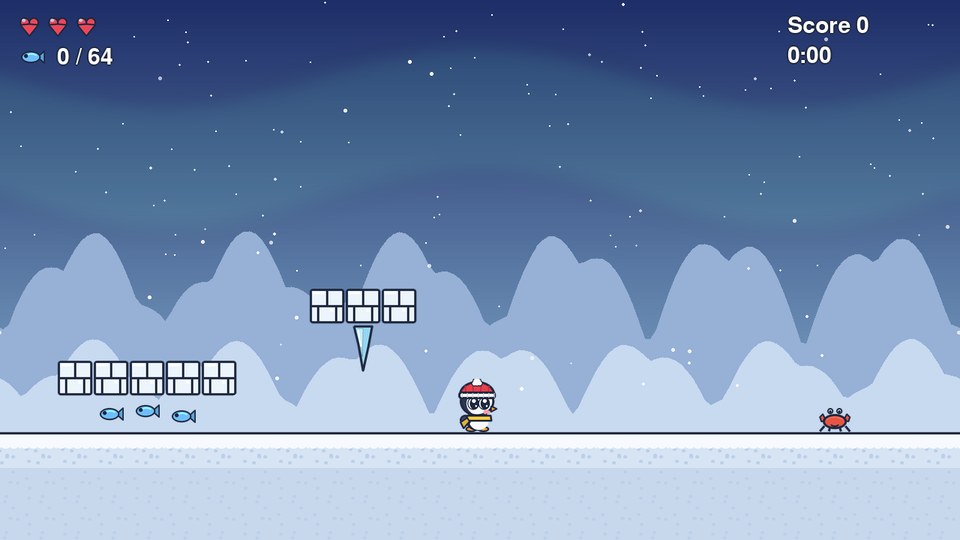
class Icicle            it hangs from a brick in the ceiling and has its own state: hang, wobble, fall, gone. A state machine for one object
the trigger             in hang, if Tux is within 70 pixels sideways and below the icicle, it changes to wobble
wobble                  for 0.6 seconds it shakes (sine wave on the x position, 60 times a second). That is the warning: the player has time to move
fall                    it speeds up with its own gravity (1800), and when its tip reaches a solid tile it is gone. Touching it at any time before that, even while hanging, is a hit
spikes                  the ^ characters: a rectangle on the lower half of the tile. Touching one is a hit. You jump over them
flags                   the k characters. Passing near one sets it to active, draws the green flag, and makes it the respawn point: self.respawn. fall() puts Tux there instead of at the start. Each flag is a list of three things: x, y and whether it has been reached
the igloo               the G character. Overlapping its rectangle calls win()
self.state              the game's state: "play", "won" or "lost". update does nothing unless the state is "play", which freezes the game on the win and game over screens. This is a state machine at its smallest
self.clock_time         seconds spent playing, added only while the state is play
lose()                  now sets the state to lost and shows a screen, instead of restarting at once
the overlay             a dark transparent panel (a Surface with an alpha) over the middle of the window, with a big title and a smaller line of text. Draw order again: the overlay is last
Enter                   in handle: if the game is not in play, reset() starts a new one

Run it:

(.venv) $ python game.py

Play the whole level. The first icicle hangs just after the first tunnel: run under it and it wobbles, then drops behind you. The first ice spikes sit on the ground before the ice stretch. Touch a flag and it turns green; fall in the water afterwards and you reappear at the flag, not at the start. Reach the igloo at the far end and the win screen shows. Lose three hearts and the lost screen shows. Press Enter to start again. (Checked: 3 icicles, 6 spike tiles and 3 checkpoint flags in the level. An icicle starts wobbling when Tux comes within 70 pixels, and a second and a bit later it has fallen and gone. A test bot that plays the level by looking ahead finishes it in about 44 seconds with all three hearts.) The whole file after this step is also waddle-run-ep09.zip.