Ice you cannot stop on, and a belly-slide that fits through a gap a standing penguin cannot.
▶Prefer to watch? This short video runs this page's main commands on a real Ubuntu 24.04 desktop, with on-screen captions and a synthetic voiceover (an AI voice trained on the author's own recording). Click to play, or watch it on YouTube.
Episode 8 ends with this: the ice tiles are slippery (Tux speeds up and slows down slowly, and glides on after you let go), and pressing Down while running starts a belly-slide: a long glide with a flatter, smaller hitbox that fits under the low tunnels of the level. If he is still under a ceiling when he would stand up, he stays low and crawls out.

You will need: your project from episode 7, or the starter files below.
You will make: ice friction, a slide state, a second hitbox and a headroom check.
You will learn: friction as a number, a state that changes the hitbox, and how to avoid getting stuck inside a ceiling.
Starter files: waddle-run-ep07.zip is where this episode begins, waddle-run-ep08.zip is where it ends. Both have the art folder.

The code of each step was run headless on Python 3.12 and pygame 2.5.2, and the numbers quoted below were measured by running it at 60 frames per second. Indentation matters in Python: the new lines on this page keep the indentation they need, so copy it exactly.
Where we start
$ cd waddle-run
$ source .venv/bin/activate
(.venv) $ python game.py

Tux runs, jumps, stomps and collects fish. The ice tiles (=) look different but they feel exactly like snow. The tunnel in the level, a row of bricks at head height, is a dead end: he cannot get under it.
Step 1: ice and the belly-slide
Both features change how Tux's speed changes, and one changes his shape. Make these changes:

Add this after line 52 of your file (HURT_TIME = 1.6)

SLIDE_W, SLIDE_H = 44, 26
ICE_ACCEL = 900
ICE_FRICTION = 260
SLIDE_FRICTION = 420

- - -

Add this after line 82 of your file (art["hurt"] = load("penguin_hurt.png"))

    art["slide"] = load("penguin_slide.png")

- - -

Add this after line 167 of your file (self.prev_bottom = y)

        self.sliding = False

- - -

Replace line 170

        w, h = STAND_W, STAND_H

with

        w, h = (SLIDE_W, SLIDE_H) if self.sliding else (STAND_W, STAND_H)

- - -

Replace line 197

        self.vx = approach(self.vx, move * RUN_SPEED, (ACCEL if move else FRICTION) * dt)

with

        accel, friction = ACCEL, FRICTION
        if self.on_ice():
            accel, friction = ICE_ACCEL, ICE_FRICTION
        if keys[pygame.K_DOWN] and self.on_ground and abs(self.vx) > 150:
            self.sliding = True
        if self.sliding:
            if (not keys[pygame.K_DOWN] or abs(self.vx) < 60) and self.can_stand():
                self.sliding = False
            elif abs(self.vx) < 60:
                self.vx = self.facing * 120  # stuck under a low ceiling: crawl out
            else:
                self.vx = approach(self.vx, 0, SLIDE_FRICTION * dt)
        else:
            self.vx = approach(self.vx, move * RUN_SPEED, (accel if move else friction) * dt)

- - -

Replace line 204

        if self.buffer > 0 and self.coyote > 0:

with

        if self.buffer > 0 and self.coyote > 0 and not self.sliding:

- - -

Add this after line 216 of your file (self.walk += abs(self.vx) * dt)

    def on_ice(self):
        return self.on_ground and tile_at(int(self.x // TILE), int(self.y // TILE)) == "="

    def can_stand(self):
        stand = pygame.Rect(round(self.x - STAND_W / 2), round(self.y - STAND_H), STAND_W, STAND_H)
        return not solids_near(stand)

- - -

Add this after line 226 of your file (self.vx = -self.facing * 320)

        self.sliding = False

- - -

Add this after line 236 of your file (img = art["hurt"])

        if self.sliding:
            img = art["slide"]

What is new:

ICE_ACCEL, ICE_FRICTION       on ice, speeding up takes 900 instead of 2600, and slowing down only 260 instead of 2200. Ice is the same equations with smaller numbers
on_ice()                      is the tile under Tux's feet an ice tile? It looks at the tile at his feet
SLIDE_W, SLIDE_H = 44, 26     the slide hitbox: wider and only 26 pixels tall. A standing Tux is 60 tall, and the tunnel is 48, so only the slide fits
self.sliding                  the new state. It starts when Down is held, Tux is on the ground and he is running faster than 150 pixels a second
rect()                        now picks the hitbox by state: the slide hitbox when sliding. Everything that uses rect() gets the right shape for free
SLIDE_FRICTION = 420          while sliding he cannot steer: the speed just approaches 0 at 420. So a slide is a commitment
can_stand()                   builds the standing rectangle at the same spot and asks solids_near if anything is in it. If so, there is a ceiling above
stopping the slide            when the key is up or the speed is below 60, AND there is room to stand, he gets up. If there is not room, he cannot stand up: he crawls out at 120 pixels a second in the direction he faces. A ceiling can never trap him
getting hurt ends the slide   hurt sets sliding to False so a hit does not leave him as a flat penguin
the slide picture             a belly-down penguin with his scarf streaming behind

Run it:

(.venv) $ python game.py

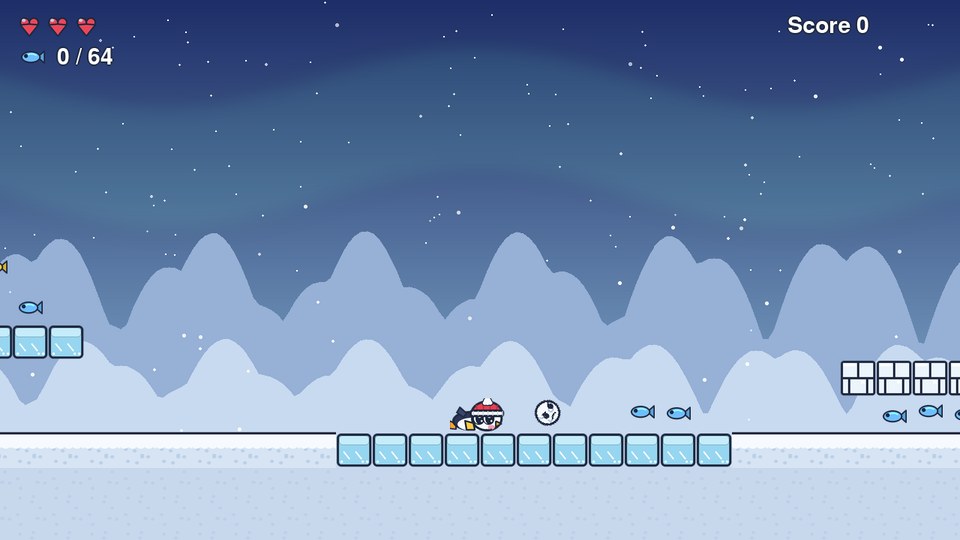
Run onto the stretch of ice: he speeds up slowly and, if you let go, glides a long way. Run at the low tunnel and press Down: he drops to his belly, glides under the bricks, and stands again on the other side. (Checked: let go on snow and Tux stops after 26 pixels; on ice he coasts 246 pixels over 1.4 seconds, about five tiles. A slide at full speed on snow goes 149 pixels in 0.77 seconds, just over three tiles.) The whole file after this step is also waddle-run-ep08.zip.
Episode 8 running (a screenshot of the finished episode).
Tuning the feel
Sliding is a few numbers:

ICE_FRICTION   at 260 Tux coasts about five tiles. Make it 100 and the ice becomes a rink; 800 and it feels like snow with a little wax on it
SLIDE_FRICTION how long a slide lasts. At 420 it is just over three tiles: enough for the longest tunnel in the level (five tiles) only if you start at full speed and crawl the rest
the 150 in the start of a slide   how fast you must be running to slide. Without it you can slide from standing still
the 60 and 120                    when a slide ends, and how fast the crawl is
Try it yourself
Three small changes before episode 9:

1  Make the whole level icy: change the ice and snow friction to the same low value. Is it still fun?
2  Make the slide faster by giving Tux a little extra speed when it starts. (Hint: one line where sliding becomes True.)
3  Let him jump out of a slide. (Hint: the jump line has a test for sliding.)

Episode 9 adds dangers from above, and a way to win.
Check your work
If something is different:

Tux never slides                           the Down key must be held while he is on the ground going faster than 150
he gets stuck in the tunnel                can_stand must check the standing rectangle, and the crawl branch must exist
the slide hitbox never changes             rect() must use self.sliding
the ice feels like snow                    on_ice looks at the tile under the feet: tile_at(int(self.x // TILE), int(self.y // TILE))
he stands up inside a ceiling              the stand-up condition needs both "key up or slow" and can_stand()

Not run in the lab: sliding down slopes (there are none), and a slide into an enemy. A slide that ends with Tux's feet over a gap was not tested separately.