Fish in the air, a score that counts them, and a first look at a heads-up display.
▶Prefer to watch? This short video runs this page's main commands on a real Ubuntu 24.04 desktop, with on-screen captions and a synthetic voiceover (an AI voice trained on the author's own recording). Click to play, or watch it on YouTube.
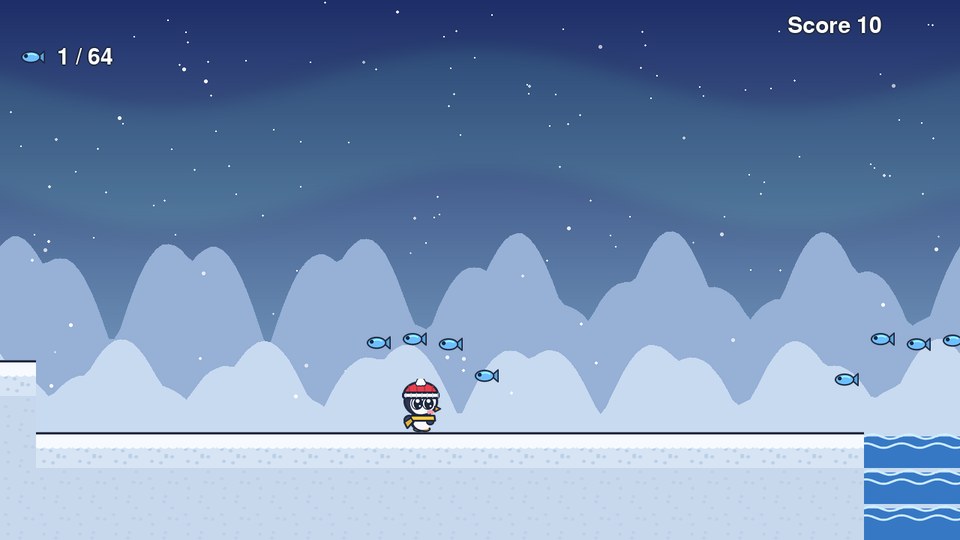
Episode 6 ends with this: 64 fish hang in arcs and rows through the level (61 normal and 3 golden, which are worth five times as much). Tux swims through them, they vanish, the score goes up, and the corner of the window shows how many you have collected.

You will need: your project from episode 5, or the starter files below.
You will make: a Fish class, collecting, a reset method, a score and a text helper.
You will learn: building a list of objects from the level text, rectangle overlap tests, and text with an outline.
Starter files: waddle-run-ep05.zip is where this episode begins, waddle-run-ep06.zip is where it ends. Both have the art folder.

The code of each step was run headless on Python 3.12 and pygame 2.5.2, and the numbers quoted below were measured by running it at 60 frames per second. Indentation matters in Python: the new lines on this page keep the indentation they need, so copy it exactly.
Where we start
$ cd waddle-run
$ source .venv/bin/activate
(.venv) $ python game.py

Tux runs and jumps on solid ground, and falling in the water sends him back to the start. The f and F characters in the level are there, but nothing draws them.
Step 1: fish
The level text already says where the fish are. We turn each f and F into a Fish object, once, when the game starts. Make these changes:

Add this after line 70 of your file (art["jump"] = load("penguin_jump.png"))

    art["fish"] = load("fish.png")
    art["gold"] = load("fish_gold.png")

- - -

Add this after line 126 of your file (screen.blit(img, (tx * TILE - cam_x, ty * TILE)))

def draw_text(screen, font, text, pos, color=(255, 255, 255), centre=False):
    """Text with a dark outline so it reads on any background."""
    face = font.render(text, True, color)
    edge = font.render(text, True, (30, 40, 62))
    x, y = pos
    if centre:
        x -= face.get_width() // 2
    for ox, oy in ((-2, 0), (2, 0), (0, -2), (0, 2)):
        screen.blit(edge, (x + ox, y + oy))
    screen.blit(face, (x, y))

- - -

Add this after line 198 of your file (screen.blit(img, (self.x - cam_x - img.get_width() / 2, self.y - img.get_height() + 1)))

class Fish:
    def __init__(self, tx, ty, gold):
        self.x, self.y, self.gold = tx * TILE + TILE / 2, ty * TILE + TILE / 2, gold
        self.alive = True

    def rect(self):
        return pygame.Rect(round(self.x - 20), round(self.y - 14), 40, 28)

    def draw(self, screen, art, cam_x, t):
        img = art["gold" if self.gold else "fish"]
        bob = math.sin(t * 3 + self.x * 0.05) * 4
        screen.blit(img, (self.x - cam_x - img.get_width() / 2, self.y + bob - img.get_height() / 2))

- - -

Add this after line 206 of your file (self.start = (row.index("P") * TILE + TILE / 2, (ty + 1) * TILE))

        self.font = pygame.font.Font(None, 44)
        self.reset()

    def reset(self):
        self.fish = [Fish(tx, ty, ch == "F") for ty, row in enumerate(LEVEL) for tx, ch in enumerate(row) if ch in "fF"]
        self.fish_total = len(self.fish)
        self.score = 0

- - -

Add this after line 220 of your file (self.fall())

        for fish in self.fish:
            if fish.alive and tux.rect().colliderect(fish.rect()):
                fish.alive = False
                self.score += 50 if fish.gold else 10

- - -

Add this after line 228 of your file (draw_level(screen, self.art, self.cam_x, self.t))

        for fish in self.fish:
            if fish.alive:
                fish.draw(screen, self.art, self.cam_x, self.t)

What is new:

class Fish             where it is (x, y at the middle of its tile), whether it is golden, and whether it is still there (alive)
Fish.rect()            a 40 by 28 rectangle round the fish: the area that counts as touching it. It is a little bigger than the picture so grabbing one is forgiving
bob = sin(t * 3 + x * 0.05) * 4    each fish floats up and down by four pixels. Adding its own x to the angle makes them bob out of step, so a row of fish ripples
Game.reset()           builds all the game's objects from the level text. It is a separate method because we will want to start over when the player dies. Game.__init__ calls it once
a list comprehension   [Fish(...) for ty, row in enumerate(LEVEL) for tx, ch in enumerate(row) if ch in "fF"]: go through every tile, and make a Fish for each f and F
tux.rect().colliderect(fish.rect())    do these two rectangles overlap? One call
fish.alive = False     collected. We keep the object but skip it when drawing and counting. Deleting from a list while looping over it is a classic way to get bugs
score                  10 for a fish, 50 for a golden one
self.fish_total        how many there are: 64

Run it:

(.venv) $ python game.py

Fish float in arcs: over the starting stretch, above the water gap (a reward for jumping it) and over the ice platform, where the golden fish is. Run through them and they vanish. The score is not shown yet; that is the next step. (Checked: 64 fish in the level, 3 of them golden, so the best possible fish score is 760.)
Step 2: the score on screen
A heads-up display (HUD) is information drawn on the screen and not in the world: it does not move with the camera. Make this change:

Add this after line 271 of your file (self.tux.draw(screen, self.art, self.cam_x))

        got = sum(1 for f in self.fish if not f.alive)
        screen.blit(self.art["fish"], (26, 66))
        draw_text(screen, self.font, f"{got} / {self.fish_total}", (76, 62))
        draw_text(screen, self.font, f"Score {self.score}", (WIDTH - 230, 20))

What is new:

draw_text(...)         draws the text four times in dark blue, each copy moved two pixels left, right, up and down, and then once in white on top. That gives the text an outline, so it reads on snow and on night sky alike
pygame.font.Font(None, 44)    pygame's built-in font at size 44. Nothing to install
the fish counter       a small fish icon, then 'got / total'. got is counted from the fish that are no longer alive
the score              top right. It is drawn at a fixed screen position, not minus cam_x: that is what makes it a HUD
HUD last               it is drawn after everything else, so it is on top of everything

Run it:

(.venv) $ python game.py

The top left shows a fish and how many you have, and the top right shows the score. Collecting a fish counts up both. The whole file after step 2 is also waddle-run-ep06.zip.
Episode 6 running (a screenshot of the finished episode).
Try it yourself
Three small changes before episode 7:

1  Make the golden fish worth 200.
2  Add a fish somewhere hard to reach: put an f in LEVEL above the ice platform. Can you get it?
3  Show the fish score as well as the count. (Hint: the number of fish already tells you the score, but not the golden ones.)

Episode 7 adds enemies.
Check your work
If something is different:

KeyError: 'fish'                         art["fish"] and art["gold"] are missing from load_art
NameError: name 'Fish' is not defined    the class goes above Game
AttributeError: no attribute 'fish'      Game.__init__ must call self.reset()
fish never disappear                     the colliderect check is missing in Game.update, or it is before tux.update
the HUD moves with the world             the HUD is drawn with cam_x subtracted; it must use fixed positions

Not run in the lab: more than the one level, and fonts other than the built-in one.