Walls, steps, platforms and a gap in the ground. The collision trick every tile game uses: move on one axis, fix it, then the other.
▶Prefer to watch? This short video runs this page's main commands on a real Ubuntu 24.04 desktop, with on-screen captions and a synthetic voiceover (an AI voice trained on the author's own recording). Click to play, or watch it on YouTube.
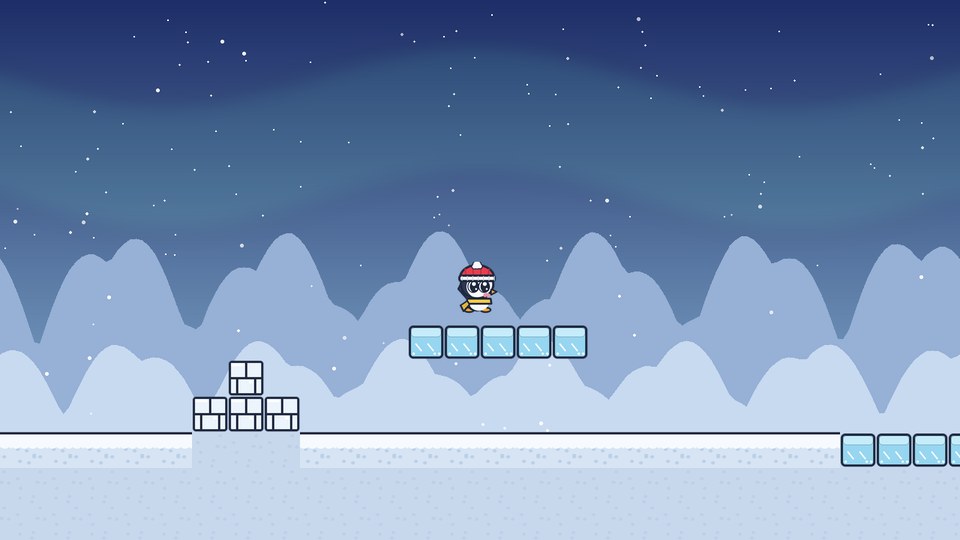
Episode 5 ends with this: the flat floor is gone. Tux runs on the real snow tiles, bumps into brick walls, climbs the snow-brick steps by jumping, lands on the ice platform, hits his head on a ceiling, and if he runs into the water gap he falls out of the bottom of the world and comes back to the start.

You will need: your project from episode 4, or the starter files below.
You will make: a hitbox, solid tiles, collision on each axis and a respawn.
You will learn: rectangles, why you resolve collisions one axis at a time, and what to do when the player falls off the world.
Starter files: waddle-run-ep04.zip is where this episode begins, waddle-run-ep05.zip is where it ends. Both have the art folder.

The code of each step was run headless on Python 3.12 and pygame 2.5.2, and the numbers quoted below were measured by running it at 60 frames per second. Indentation matters in Python: the new lines on this page keep the indentation they need, so copy it exactly.
Where we start
$ cd waddle-run
$ source .venv/bin/activate
(.venv) $ python game.py

Tux jumps and runs on an invisible flat floor and walks straight through every brick and across the water gap. The level is only a picture so far.
Step 1: solid tiles
We need to answer one question: what is Tux overlapping? Then push him out. Make these changes:

Add this after line 37 of your file (LEVEL_W, LEVEL_H = COLS * TILE, ROWS * TILE)

SOLID = "#=B"

- - -

Replace line 43

FLOOR_Y = 12 * TILE

with

MAX_FALL = 1300

- - -

Add this after line 47 of your file (BUFFER = 0.10  # seconds a jump press is remembered before landing)

STAND_W, STAND_H = 30, 60  # the hitbox is smaller than the picture

- - -

Add this after line 84 of your file (return max(value - step, target))

def solids_near(rect):
    """The rectangles of every solid tile the given rectangle touches."""
    found = []
    for ty in range(rect.top // TILE, (rect.bottom - 1) // TILE + 1):
        for tx in range(rect.left // TILE, (rect.right - 1) // TILE + 1):
            if tile_at(tx, ty) in SOLID:
                found.append(pygame.Rect(tx * TILE, ty * TILE, TILE, TILE))
    return found

- - -

Add this after line 128 of your file (self.buffer = 0.0)

    def rect(self):
        w, h = STAND_W, STAND_H
        return pygame.Rect(round(self.x - w / 2), round(self.y - h), w, h)

    def move_x(self, dx):
        self.x += dx
        for tile in solids_near(self.rect()):
            if dx > 0:
                self.x = tile.left - self.rect().w / 2
            elif dx < 0:
                self.x = tile.right + self.rect().w / 2
            self.vx = 0.0

    def move_y(self, dy):
        self.y += dy
        self.on_ground = False
        for tile in solids_near(self.rect()):
            if dy > 0:
                self.y = tile.top
                self.on_ground = True
            elif dy < 0:
                self.y = tile.bottom + self.rect().h
            self.vy = 0.0

- - -

Replace line 134

        self.vy += GRAVITY * dt

with

        self.vy = min(self.vy + GRAVITY * dt, MAX_FALL)

- - -

Replace lines 145-150

        self.x += self.vx * dt
        self.y += self.vy * dt
        if self.y >= FLOOR_Y:  # no tiles to stand on yet: just a flat floor
            self.y, self.vy, self.on_ground = FLOOR_Y, 0.0, True
        else:
            self.on_ground = False

with

        self.move_x(self.vx * dt)
        self.move_y(self.vy * dt)

What is new:

SOLID = "#=B"           the characters that are solid: snow, ice and bricks. Water, fish and the rest are not
STAND_W, STAND_H        the hitbox: 30 pixels wide and 60 tall, smaller than the picture (60 by 72, which includes the hat and the pom-pom). A hitbox a little smaller than the drawing is kinder: you do not get stopped by a pixel of hat
MAX_FALL                a speed limit for falling, 1300 pixels a second, so a long fall cannot make him fast enough to go through a tile in one frame
solids_near(rect)       returns the rectangles of every solid tile that a rectangle touches. It only looks at the few tiles round Tux, not the whole level
Tux.rect()              the hitbox as a pygame.Rect. Rect is a built-in: it has left, right, top, bottom, and colliderect
move_x(dx)              move sideways, then check. If there is a solid tile in the way, put Tux against its edge: its left side if he was moving right, its right side if he was moving left. And stop vx
move_y(dy)              the same on the vertical axis. If he was falling, he lands: y is set to the tile's top and on_ground is True. If he was rising, his head hit the tile: y is set under it
one axis at a time      move x and fix it, THEN move y and fix it. If you move both and then fix, you cannot tell which side you hit, and you snag on the joins between tiles and get stuck on walls
self.on_ground          set to False at the start of move_y, and True only if a tile stopped a fall. That is the on_ground that jumping needs: it is now true on every solid surface, not just the floor

Run it:

(.venv) $ python game.py

Tux runs on the snow, stops against the brick wall at the first step, jumps up the steps, and lands on top of the floating ice platform. The water gap is a problem: he walks into it and falls, and keeps falling without ever stopping, because there is nothing to put him back. (Checked: running at the brick wall, Tux stops at x = 2289, exactly 15 pixels, half his width, from the tile's left edge at 2304. After running into the gap he was still falling at 16,000 pixels down at the end of the test.)
Step 2: falling out of the world
A world needs a rule for the case of falling out of it. For now: go back to the start. Make this change:

Add this after line 218 of your file (self.cam_x = min(max(tux.x - WIDTH / 2, 0), LEVEL_W - WIDTH)  # follow Tux, but never show past the world's edge)

        if tux.y > LEVEL_H + 150:  # fell out of the bottom of the world
            self.fall()

    def fall(self):
        self.tux.x, self.tux.y = self.start
        self.tux.vx = self.tux.vy = 0.0

What is new:

tux.y > LEVEL_H + 150   below the bottom of the level and a bit more: he is gone. The extra 150 pixels let him fall off the screen before he disappears
fall()                  put Tux back at the start position and stop him. Episode 7 turns this into losing a heart, and episode 9 into going back to the last checkpoint

Run it:

(.venv) $ python game.py

Run into the water gap and Tux falls out of the bottom of the window, and a moment later is back at the start. (Checked: falling in takes 0.7 seconds, and he reappears at the start tile.) The whole file after step 2 is also waddle-run-ep05.zip.
Episode 5 running (a screenshot of the finished episode).
Try it yourself
Three small changes before episode 6:

1  Make a wall: change some characters in LEVEL to B and run into it. Make a tunnel and try to jump in it.
2  Change STAND_W to 60 and notice how Tux gets caught on corners. Put it back to 30.
3  Make MAX_FALL smaller (say 500) and watch how falling feels.

Episode 6 adds something to collect.
Check your work
If something is different:

Tux falls through the ground                    solids_near is not being used in move_y, or SOLID does not include #
he sticks to walls and jerks                     you moved x and y together; they are two calls
he is stuck inside a tile after he respawns     the start position must be above ground: the P in the level
nothing happens when he falls in the water      the fall check is in Game.update, after tux.update

Not run in the lab: very high speeds (MAX_FALL keeps a long fall from tunnelling through a tile, but nothing else was tested at extreme speeds), and tiles that are not 48 pixels.