Jump, fish, stomp, ouch, win and lose sounds, an electronic loop, a title screen and a best time that is still there tomorrow.
▶Prefer to watch? This short video runs this page's main commands on a real Ubuntu 24.04 desktop, with on-screen captions and a synthetic voiceover (an AI voice trained on the author's own recording). Click to play, or watch it on YouTube.
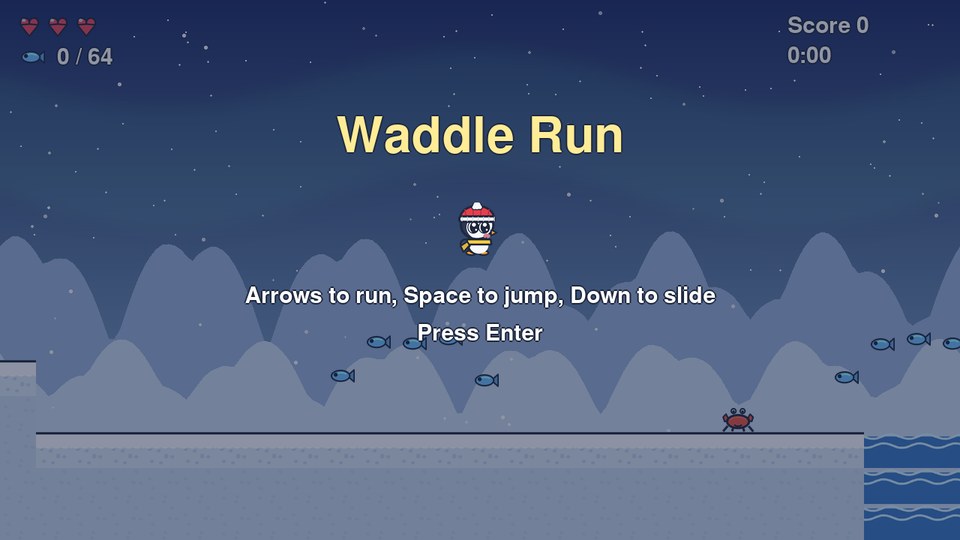
Episode 10 ends with this: the game opens on a title screen. Press Enter and the music starts, an original electronic loop (all synthesized with Python, no samples). Every event has a sound: jump, fish, stomp, getting hurt, winning and losing. When you win, your time is saved to a file, and the title screen and win screen show the best time, even after you quit and start the game again.

You will need: your project from episode 9, or the starter files below. The starter zip has a sounds folder and a music folder as well.
You will make: a sound loader, a play method, music, a title state and a saved best time.
You will learn: pygame.mixer, event lists between objects, and saving a small JSON file in the right place on Linux.
Starter files: waddle-run-ep09.zip is where this episode begins, waddle-run-ep10.zip is where it ends. Both have the art folder.

The code of each step was run headless on Python 3.12 and pygame 2.5.2, and the numbers quoted below were measured by running it at 60 frames per second. Indentation matters in Python: the new lines on this page keep the indentation they need, so copy it exactly.
Where we start
$ cd waddle-run
$ source .venv/bin/activate
(.venv) $ python game.py

A complete, silent game: you can play it and win it, and it starts straight in the level.
Where the sounds come from
Everything you hear was made for this project, with Python:

sounds/jump.wav, fish.wav, stomp.wav, hurt.wav, win.wav, lose.wav   six short effects made by make_sounds.py (a sine sweep for the jump, two bright notes for a fish, a low thump and a puff of noise for a stomp, a buzzy falling tone for a hurt, a rising arpeggio for a win and a falling one for a lose). It is in the zip, so you can change them
music/loop.wav          an original electronic loop made by make_music.py: 15.0 seconds, 128 beats per minute, eight bars in A minor with a four-on-the-floor kick, a bouncy bass, a plucky arpeggio, a bell-like melody and a soft pad. It repeats without a click

Nothing is downloaded, and nothing is licensed: if you change or share the game, you can also change or share its sounds. The files in waddle-run-ep10.zip are fish.wav, hurt.wav, jump.wav, lose.wav, stomp.wav, win.wav in the sounds folder and loop.wav in the music folder.
Step 1: sound, music, a title and a best time
This episode has a lot of small additions that belong together. Make these changes:

Add this after line 2 of your file ("""Waddle Run: Tux the penguin runs, jumps and stomps through an icy side-scroller.""")

import json

- - -

Add this after line 3 of your file (import math)

import os

- - -

Replace line 7

import pygame

with

# GNOME groups the window under waddle-run.desktop by this name.
# SDL reads it when pygame loads, so it has to be set before the import.
os.environ.setdefault("SDL_VIDEO_X11_WMCLASS", "waddle-run")
import pygame  # noqa: E402

- - -

Add this after line 13 of your file (ART = HERE / "art")

SOUNDS = HERE / "sounds"
MUSIC = HERE / "music" / "loop.wav"
SAVE = Path(os.environ.get("XDG_DATA_HOME", Path.home() / ".local/share")) / "waddle-run" / "best.json"

- - -

Add this after line 178 of your file (self.sliding = False)

        self.events = []

- - -

Add this after line 230 of your file (self.buffer = self.coyote = 0.0)

            self.events.append("jump")

- - -

Add this after line 370 of your file (self.cam_x = 0.0)

        self.sounds = {}

- - -

Add this after line 390 of your file (self.clock_time = 0.0)

        self.state = "title"
        self.best = load_best()

- - -

Replace lines 396-397

            if event.key == pygame.K_RETURN and self.state != "play":
                self.reset()

with

            if event.key == pygame.K_RETURN:
                if self.state == "title":
                    self.reset()
                    self.state = "play"
                elif self.state != "play":
                    self.reset()
                    self.state = "play"

- - -

Add this after line 412 of your file (self.score += 50 if fish.gold else 10)

                self.play("fish")

- - -

Add this after line 421 of your file (self.score += 100 * 2 ** min(tux.combo - 1, 3)  # chained stomps without touching the ground: 100, 200, 400, 800)

                self.play("stomp")

- - -

Add this after line 437 of your file (self.win())

        for name in tux.events:
            self.play(name)
        tux.events.clear()

- - -

Add this after line 447 of your file (if self.tux.hurt():)

            self.play("hurt")

- - -

Add this after line 452 of your file (self.state = "lost")

        self.play("lose")

- - -

Add this after line 455 of your file (self.state = "won")

        self.play("win")
        if self.clock_time < self.best or self.best == 0:
            self.best = self.clock_time
            save_best(self.best)

    def play(self, name):
        sound = self.sounds.get(name)
        if sound:
            sound.play()

- - -

Replace line 472

        self.tux.draw(screen, self.art, self.cam_x)

with

        if self.state != "title":
            self.tux.draw(screen, self.art, self.cam_x)

- - -

Add this after line 486 of your file (draw_text(screen, self.font, "Press Enter to play again", (WIDTH // 2, 370), centre=True))

        if self.state == "won" and self.best:
            draw_text(screen, self.font, f"Best time {int(self.best // 60)}:{int(self.best % 60):02d}", (WIDTH // 2, 410), centre=True)
        if self.state == "title":
            panel = pygame.Surface((WIDTH, HEIGHT), pygame.SRCALPHA)
            panel.fill((20, 30, 60, 120))
            screen.blit(panel, (0, 0))
            draw_text(screen, self.big, "Waddle Run", (WIDTH // 2, 150), (255, 236, 150), centre=True)
            screen.blit(self.art["stand"], (WIDTH // 2 - 30, 270))
            draw_text(screen, self.font, "Arrows to run, Space to jump, Down to slide", (WIDTH // 2, 380), centre=True)
            draw_text(screen, self.font, "Press Enter", (WIDTH // 2, 430), centre=True)
            if self.best:
                draw_text(screen, self.font, f"Best time {int(self.best // 60)}:{int(self.best % 60):02d}", (WIDTH // 2, 480), centre=True)


def load_best():
    try:
        return json.loads(SAVE.read_text())["best"]
    except (OSError, ValueError, KeyError):
        return 0


def save_best(seconds):
    SAVE.parent.mkdir(parents=True, exist_ok=True)
    SAVE.write_text(json.dumps({"best": seconds}))


def load_sounds():
    sounds = {}
    for name in ("jump", "fish", "stomp", "hurt", "win", "lose"):
        try:
            sounds[name] = pygame.mixer.Sound(SOUNDS / f"{name}.wav")
        except (pygame.error, FileNotFoundError):
            pass
    return sounds

- - -

Add this after line 495 of your file (game = Game(art))

    try:
        pygame.mixer.music.load(MUSIC)
        pygame.mixer.music.set_volume(0.5)
        pygame.mixer.music.play(-1)
    except pygame.error:
        pass  # no sound card: play without sound
    game.sounds = load_sounds()

What is new:

SDL_VIDEO_X11_WMCLASS   one line at the top, before pygame is imported, that gives the window a name on the Linux desktop. We use it in episode 11 so that the dock shows a proper icon. It has to be set before the import because SDL reads it when pygame loads
SOUNDS, MUSIC, SAVE     where things are: the sound folder and the music file next to the game, and the best-time file under the user's data folder
load_sounds()           loads each wav into a pygame.mixer.Sound. If one is missing or there is no sound card it is simply left out, and the game plays without it
Game.sounds, play(name) a dictionary of sounds, and a method that plays one if it exists. The game never crashes because of sound
Tux.events              Tux does not know about sound. When he jumps he adds the word "jump" to a list, and Game plays whatever is in the list after he has updated. It keeps the player class free of everything except the player
pygame.mixer.music      one long track that streams and repeats forever: load, set_volume(0.5) so it sits behind the effects, play(-1) where -1 means loop for ever
the "title" state       the new first state. Draws the level behind a dark panel, the name, the controls and the best time. Enter starts a game
save_best, load_best    when you win, if your time beats the saved one, write it to ~/.local/share/waddle-run/best.json. json.dumps is the whole format. If the file is not there, or is broken, load_best answers 0
XDG_DATA_HOME           the Linux convention for where programs keep user data: the folder named in that variable, or ~/.local/share if it is not set. Using it means the game behaves on any desktop, and nothing is written to the project folder

Run it:

(.venv) $ python game.py

The title screen appears over the level. Press Enter: the music starts. Jump, collect a fish, stomp a crab, get hurt: each makes its sound. Finish the level and the win screen shows your time and the best time. Quit, start the game again and the title screen shows the best time from last time. The whole file after this step is also waddle-run-ep10.zip.
Episode 10 running (a screenshot of the finished episode).
Tuning the feel
Sound is a few numbers:

set_volume(0.5)     the music's level. Effects are at full volume, so they stand out. Make the music 0.2 for a quiet game
the loop            replace music/loop.wav with your own: any wav of any length that loops cleanly. Keep that folder to one file
the sound files     try replacing jump.wav with something else: no code changes are needed
Try it yourself
Three small changes:

1  Add a sound for the checkpoint flag. (Hint: make_sounds.py, a new name in load_sounds, and a play call where the flag is reached.)
2  Show the best time on the HUD while you play.
3  Make M mute the music. (Hint: pygame.mixer.music.set_volume.)

Episode 11 turns the game into a proper Linux program: a launcher, a menu entry with an icon, and a .deb you can install.
Check your work
If something is different:

there is no sound at all                       there may be no sound card or the mixer failed; the game goes on without it. Check the sounds folder is next to game.py
KeyError in load_sounds                        it should never raise: missing files are skipped. Check the try/except around Sound
the best time is not saved                     look in ~/.local/share/waddle-run/best.json; if the folder cannot be written, check its permissions
the music cuts out and restarts                the loop file must be a clean multiple of its beats: use the one in the zip
the title screen shows the game running        the title state must freeze updates: update returns early unless the state is play

Not run in the lab: a real sound card (the tests used SDL's silent driver, so the sounds were loaded and played but nothing was heard), Bluetooth speakers, and Wayland. I cannot tell you how loud it is on your machine. Listen with your own ears.