Sounds and a music loop, a title screen with nine levels, then level clear, game over and a saved high score. Three steps.
▶Prefer to watch? This short video runs this page's main commands on a real Ubuntu 24.04 desktop, with on-screen captions and a synthetic voiceover (an AI voice trained on the author's own recording). Click to play, or watch it on YouTube.
Episode 8 ends with this: the game opens on a title screen and waits for Enter. Chomps, a power-up sound, the gull's dive, a stun, a hit and a level-clear jingle are played at the right moments, and an original music loop plays all the time. Clear the maze and the next level starts with a faster, more dangerous gull; more gulls come in later levels. Lose the last life and a game over screen shows your score and the best score ever, which is saved in a file and still there when you start the game tomorrow.

You will need: your project from episode 7 (a game.py and an art folder), the sounds and music folders from the starter zip, and the .venv.
You will make: sound loading with a safe fallback, a table of levels, the game states title, play, clear and over, and a saved high score.
You will learn: pygame.mixer, a game as a set of states, a table that drives difficulty, and reading and writing a JSON file.
Starter files: hotdog-dash-ep07.zip is where this episode begins, hotdog-dash-ep08.zip is where it ends. The ep08 zip has the art, sounds and music folders, and make_sounds.py, the script that made every sound effect.

The code of each step was run headless on Python 3.12 and pygame 2.6.1, and what it does is described below. Sound was checked only as far as the files load and the calls run: what it sounds like is for your ears.
Where we start
Open a terminal, go to the project, turn on the virtual environment and run the game:

$ cd hotdog-dash
$ source .venv/bin/activate
(.venv) $ python game.py

The game has danger, cover and a power-up, but it starts at once, has no end and is silent. The file is 394 lines. This episode adds about a hundred of them.
The sound files
Copy the sounds and music folders from hotdog-dash-ep08.zip next to game.py. The folder sounds holds six short WAV files: chomp, power, dive, stun, hit and clear. The folder music holds one file, loop.wav, the music: a loop of 7.2 seconds, 14 beats at about 117 beats a minute, composed for this game.

The six sound effects were made with Python, with nothing but the standard library: a square or triangle wave, a falling pitch, a little noise, written out with the wave module as a 16-bit mono WAV file. The script, make_sounds.py, is in the zip. You do not need to run it: the sounds are already there, and the game does not need the script. If you would like to, run python3 make_sounds.py in the project folder and it writes the six files again.
Step 1: sound and music
Make these changes to game.py:

Add this after line 2 of your file ("""Hotdog Dash: a hotdog eats condiment packets in a picnic maze while seagulls swoop in from above.""")

import json

- - -

Add this after line 3 of your file (import math)

import os

- - -

Add this after line 14 of your file (ART = HERE / "art")

SOUNDS = HERE / "sounds"
MUSIC = HERE / "music" / "loop.wav"
SAVE = Path(os.environ.get("XDG_DATA_HOME", Path.home() / ".local/share")) / "hotdog-dash" / "highscore.json"

- - -

Add this after line 62 of your file (return {p.stem: pygame.image.load(p).convert_alpha() for p in ART.glob("*.png")})

def load_sounds():
    try:
        pygame.mixer.init()
    except pygame.error:  # no sound card: the game still runs
        return {}
    return {p.stem: pygame.mixer.Sound(p) for p in SOUNDS.glob("*.wav")}


def load_high():
    try:
        return json.loads(SAVE.read_text())["high"]
    except (OSError, ValueError, KeyError):
        return 0


def save_high(score):
    SAVE.parent.mkdir(parents=True, exist_ok=True)
    SAVE.write_text(json.dumps({"high": score}))

- - -

Add this after line 202 of your file (self.state, self.timer = "dive", 0)

                game.play("dive")

- - -

Add this after line 258 of your file (self.small_font = pygame.font.Font(None, 30))

        self.big_font = pygame.font.Font(None, 120)
        self.sounds = load_sounds()
        self.high = load_high()

- - -

Add this after line 266 of your file (self.start_level())

        self.start_music()

    def start_music(self):
        if self.sounds and MUSIC.exists():
            pygame.mixer.music.load(MUSIC)
            pygame.mixer.music.set_volume(0.5)
            pygame.mixer.music.play(-1)

    def play(self, name):
        if name in self.sounds:
            self.sounds[name].play()

- - -

Add this after line 293 of your file (self.score += PACKET_SCORE[flavor])

            self.play("chomp")

- - -

Add this after line 296 of your file (self.player.hot = HOT_TIME)

            self.play("power")

- - -

Add this after line 307 of your file (self.score += 200)

                self.play("stun")

- - -

Add this after line 313 of your file (self.lives -= 1)

        self.play("hit")

What is new:

import json, import os   json is for step 3; os is for the path of the save file. Both are in the standard library
SOUNDS, MUSIC, SAVE     where the sound folder, the music file and the high score file are. SAVE is under ~/.local/share/hotdog-dash/, or under XDG_DATA_HOME if that is set, which is where Linux programs keep their data
load_sounds()           starts the mixer and loads every WAV file in the folder into a dictionary of Sound objects, by file name. If there is no sound card, mixer.init() raises pygame.error, and the function gives back an empty dictionary. The game goes on, silent. That try and except is what makes a game safe to run on a machine with no sound
load_high, save_high    for step 3. A few lines each: read a JSON file, or write one. They are here with the other helpers
play(name)              plays a sound if it is loaded. Because it checks, every call in the game is safe whether or not there is sound
start_music()           load the loop, set the volume to half and play(-1): the -1 means repeat forever. If the music file is missing, nothing happens
self.play("chomp")      a call in eat(), after a packet. Same for power, stun and hit, and game.play("dive") in the gull, when the warning is over and the dive begins

Run it:

(.venv) $ python game.py

The music plays. Every packet chomps, the bottle makes the power sound, the dive swooshes, a stun and a hit have their own sound. (Checked: the mixer loaded all six sounds, chomp, clear, dive, hit, power and stun, the music file was found, and the game ran 20 seconds of play without an error. How it sounds: your ears.)
Step 2: a title screen and nine levels
Now the game around the game. First a title screen, and the table that makes level 1 easy and level 9 hard. Make these changes:

Delete

GULL_COUNT = 1
WARN_TIME = 1.5  # seconds of warning: the shadow shrinks onto the target and a red ring appears
PAUSE = (2.5, 4.0)  # a gull waits this long between dives

- - -

Add this after line 61 of your file (STUN_TIME = 2.5)

# gulls, seconds of warning, pause between dives, for each level (the last row repeats)
LEVELS = [(1, 1.6, (3.0, 4.5)), (1, 1.4, (2.5, 4.0)), (2, 1.3, (3.0, 4.5)), (2, 1.1, (2.2, 3.6)), (3, 1.0, (2.8, 4.2)), (3, 0.9, (2.2, 3.4)), (3, 0.8, (2.0, 3.0)), (4, 0.8, (2.2, 3.4)), (4, 0.7, (1.8, 2.8))]

- - -

Add this after line 294 of your file (self.lives = START_LIVES)

        self.level = 1
        self.state = "title"
        self.clear_timer = 0

- - -

Replace lines 317-318

        self.gulls = [Gull(i * 2.1, PAUSE) for i in range(GULL_COUNT)]
        self.warn_time = WARN_TIME

with

        gulls, self.warn_time, pause = LEVELS[min(self.level - 1, len(LEVELS) - 1)]
        self.gulls = [Gull(i * 2.1, pause) for i in range(gulls)]

    def new_game(self):
        self.score = 0
        self.lives = START_LIVES
        self.level = 1
        self.player.reset()
        self.fill_packets()
        self.start_level()
        self.state = "play"

    def next_level(self):
        self.level += 1
        self.player.reset()
        self.fill_packets()
        self.start_level()
        self.state = "play"

- - -

Add this after line 328 of your file (self.player.steer(*KEYS[event.key]))

                elif event.key == pygame.K_RETURN and self.state in ("title", "over"):
                    self.new_game()

- - -

Add this after line 382 of your file (self.check_gulls())

    def draw_text(self, surf, text, font, center, color=TEXT_COLOR):
        outline = font.render(text, True, (40, 24, 60))
        for dx, dy in ((-3, 0), (3, 0), (0, -3), (0, 3), (-2, -2), (2, -2), (-2, 2), (2, 2), (3, 4)):
            surf.blit(outline, outline.get_rect(center=(center[0] + dx, center[1] + dy)))
        label = font.render(text, True, color)
        surf.blit(label, label.get_rect(center=center))

    def draw_banner(self, surf, top, height):
        banner = pygame.Surface((MAZE_W, height), pygame.SRCALPHA)
        banner.fill((30, 24, 50, 215))
        surf.blit(banner, (0, top))

- - -

Add this after line 424 of your file (self.draw_panel(surf))

        if self.state == "title":
            self.draw_banner(surf, 170, 340)
            self.draw_text(surf, "HOTDOG DASH", self.big_font, (MAZE_W / 2, 250))
            self.draw_text(surf, "Arrow keys run, watch the shadows", self.font, (MAZE_W / 2, 380))
            self.draw_text(surf, "Press Enter to start", self.font, (MAZE_W / 2, 450), (255, 220, 90))
        elif self.state == "clear":
            self.draw_banner(surf, 270, 120)
            self.draw_text(surf, "LEVEL CLEAR", self.big_font, (MAZE_W / 2, 330), (255, 220, 90))
        elif self.state == "over":
            self.draw_banner(surf, 170, 340)
            self.draw_text(surf, "GAME OVER", self.big_font, (MAZE_W / 2, 250))
            self.draw_text(surf, f"Score {self.score}   Best {self.high}", self.font, (MAZE_W / 2, 380))
            self.draw_text(surf, "Press Enter to play again", self.font, (MAZE_W / 2, 450), (255, 220, 90))

What is new:

LEVELS                 a table with one row for each level: how many gulls, how many seconds of warning, and the range of the wait between dives. Level 1 has one gull and 1.6 seconds of warning. Level 9 has four gulls and 0.7 seconds. After the last row, every level is like the last: min(self.level - 1, len(LEVELS) - 1) keeps the index inside the table
a tuple in a tuple     (1, 1.6, (3.0, 4.5)) is gulls, warning, and (shortest wait, longest wait). start_level unpacks it in one line: gulls, self.warn_time, pause = ...
self.state             the game is always in one state: "title", "play", "clear" or "over". Like the gull's states in episode 5, one string. The title is where the game starts
new_game(), next_level()    new_game sets everything to the beginning; next_level adds one to the level and refills the maze
K_RETURN               Enter, in the title or the game over screen, starts a new game
draw_text              draws a text with a dark outline: the text is drawn nine times, shifted a few pixels each way, in dark purple, and then once in front in yellow. That is what makes yellow text readable on any floor
draw_banner            a dark, half-transparent bar behind the text. pygame.SRCALPHA gives the surface an alpha channel, and the fill color has a fourth number, 215 out of 255
the end of draw        what is drawn on top of the maze depends on the state: the title, the level clear banner and the game over text

The three old constants, GULL_COUNT, WARN_TIME and PAUSE, are deleted: the table has replaced them.

Run it:

(.venv) $ python game.py

The game opens on a banner that says HOTDOG DASH, 'Arrow keys run, watch the shadows' and 'Press Enter to start'. Press Enter and the game begins. (Checked: the game started in the title state; the table has 9 levels, the first (1, 1.6, (3.0, 4.5)) and the last (4, 0.7, (1.8, 2.8)).)
Step 3: level clear, game over and the high score
The last pieces. Make these changes:

Replace line 360

            self.fill_packets()

with

            self.level_clear()

    def level_clear(self):
        self.state, self.clear_timer = "clear", 2.0
        self.play("clear")

- - -

Replace lines 387-393

        self.lives = START_LIVES
        self.score = 0
        self.fill_packets()
        self.player.reset()
        self.player.safe = SAFE_TIME
        for gull in self.gulls:
            gull.reset()

with

        self.state = "over"
        if self.score > self.high:
            self.high = self.score
            save_high(self.high)

- - -

Add this after line 395 of your file (def update(self, dt):)

        if self.state == "clear":
            self.clear_timer -= dt
            if self.clear_timer <= 0:
                self.next_level()
        if self.state != "play":
            return

- - -

Add this after line 439 of your file (surf.blit(pygame.transform.smoothscale(IMG["life"], (48, 33)), (MAZE_W + 26 + i * 60, 232)))

        surf.blit(self.font.render(f"LEVEL {self.level}", True, TEXT_COLOR), (MAZE_W + 26, 300))

What is new:

level_clear()          when the last packet is eaten, the state becomes "clear", a two second timer starts, and the jingle plays. The old line, which refilled the maze at once, is replaced
the top of update      in the clear state, count the timer down, and when it is over start the next level. Then if the state is not "play", return: nothing else moves on the title, clear or game over screens, so the gulls and the hotdog are frozen
game_over()            the state becomes "over". If the score beats the best, it becomes the new best and is written to the file with save_high
json.dumps({"high": score})   the file holds {"high": 777}: a small JSON text. load_high reads it back, and on any error (no file, a broken file, no such key) it gives back 0, the high score of someone who has never played
LEVEL on the panel     one more line, in yellow, under the lives

Run it:

(.venv) $ python game.py

Clear the maze: LEVEL CLEAR appears for two seconds, the jingle plays and level 2 begins, with its gull warning a little faster. Lose three lives: GAME OVER with 'Score 1230   Best 1230', and Enter plays again. Close the game and start it again: the best score is still there. (Checked: after the last packet the state was clear on level 1, and after the pause it was play on level 2 with 1 gull, a warning of 1.4 seconds and a full maze of 139 packets. Losing the last life with a score of 777 gave the state over, a best score of 777, and the file ~/.local/share/hotdog-dash/highscore.json containing {"high": 777}.)

The whole file after step 3 is also hotdog-dash-ep08.zip. To start the best score again from zero, delete that file.
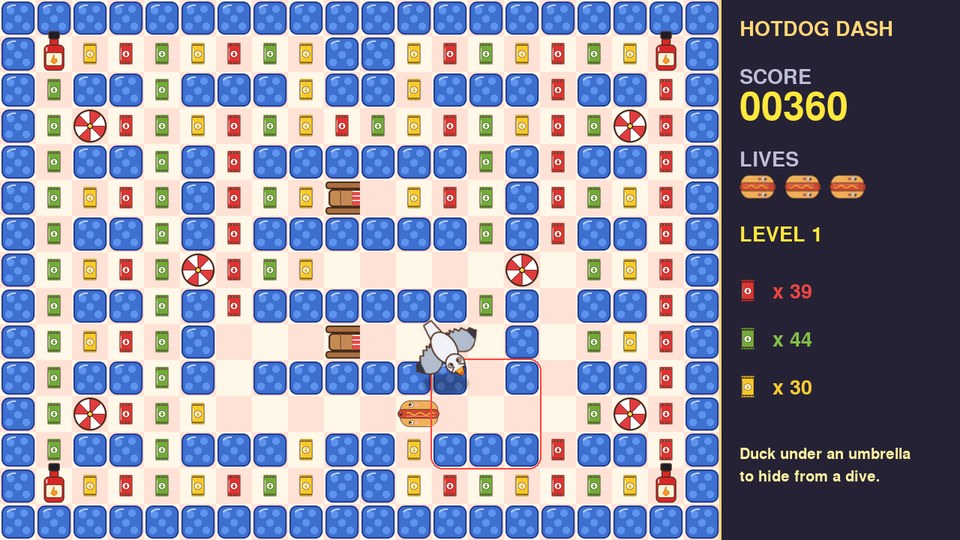
Episode 8 running (a screenshot of the finished step).
Tuning the feel
The LEVELS table is the whole difficulty of the game. Each level is a number of gulls, the seconds of warning and the wait between dives. These were chosen by simulating the game with two robot players, one that only eats and one that eats and also runs from the red ring, and then by hand. The robots say:

levels 1 to 3     a robot that dodges plays them without being hit
level 4 and up    a player who only eats and never dodges is caught

Your hands are the real test, and the table is easy to change. Try your own: make level 1 harder, or the last row much harder.
Try it yourself
Three small changes before episode 9:

1  Add a tenth row to LEVELS. What happens when you reach it, and what if you reach level 11?
2  Make the clear banner say which level you finished: draw_text with f"LEVEL {self.level} CLEAR".
3  Turn the music down: set_volume(0.5) is a number between 0 and 1. Or turn it off by leaving the music file out.

Episode 9 is the last one: a launcher, an icon and a .deb package, so the game can be installed like any other program.
Check your work
If something is different:

NameError: name 'LEVELS' is not defined     the table goes with the other constants, above the classes
IndexError: tuple index out of range        a row of LEVELS needs all three parts: gulls, warning, (shortest, longest)
the game is silent                          the sounds folder is not next to game.py. Without it, load_sounds finds nothing and the game stays quiet instead of failing
pygame.error: ALSA ...                      no sound card: the game still runs, silent. On a desktop it should find one
the title never goes away                   K_RETURN is handled in handle_events: check the line, and that new_game() sets self.state = "play"
the best score is not kept                  save_high is only called in game_over, and the folder is made by SAVE.parent.mkdir(parents=True, exist_ok=True)

Not run in the lab: other Linux distributions, Wayland-only sessions and pygame older than 2.6. How the sound and music actually sound was not checked by the code. The numbers in the checks come from running each stage at 60 frames per second.