A gull flies over the maze and its shadow slides across the floor: a path made of sines, and one number for height. Two small steps.
▶Prefer to watch? This short video runs this page's main commands on a real Ubuntu 24.04 desktop, with on-screen captions and a synthetic voiceover (an AI voice trained on the author's own recording). Click to play, or watch it on YouTube.
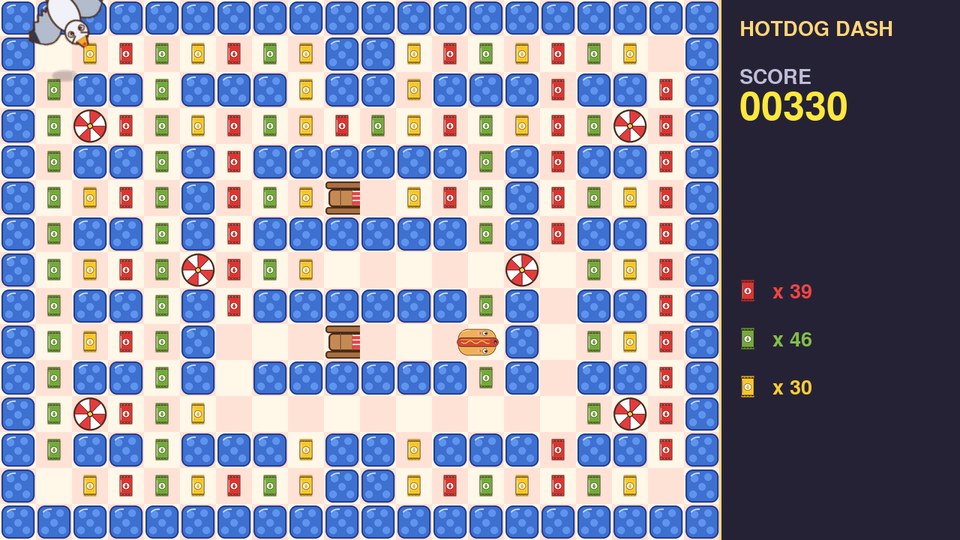
Episode 4 ends with this: a seagull flaps its wings high above the maze, flying a slow looping figure, and its shadow slides over the floor beneath it, small and faint because the gull is high up. The gull is harmless for now; the dive is episode 5.

You will need: your project from episode 3 (a game.py, an art folder and the .venv), or the starter files below.
You will make: a Gull class, a path for it to fly, and a way to draw it above its own shadow.
You will learn: sine and cosine as a path, how a single altitude number can fake a third dimension, and a list of objects with one method each for update and draw.
Starter files: hotdog-dash-ep03.zip is where this episode begins, hotdog-dash-ep04.zip is where it ends. Both have the art folder.

The code of each step was run headless on Python 3.12 and pygame 2.6.1, and what it does is described below.
Where we start
Open a terminal, go to the project, turn on the virtual environment and run the game:

$ cd hotdog-dash
$ source .venv/bin/activate
(.venv) $ python game.py

The hotdog runs, eats the packets, chomps, and the panel keeps the score. There is no danger yet. The file is 212 lines. We add one class, Gull, after Hotdog, and change Game in three places.
The third dimension
The game is flat: a top-down picture of a picnic. But the gull is up in the air, and a gull in the air makes a shadow on the ground. The trick is to draw two things for one gull:

the shadow    on the ground, at the gull's map position (x, y)
the gull      drawn higher up the screen by a number of pixels, and a little bigger, because it is closer to us

One number, alt, says how high it is: 1.0 is high in the air, 0.0 is on the ground. The shadow is small and faint when alt is 1 and grows and darkens as alt falls. The gull is drawn 80 pixels times alt above its shadow. When the gull lands in episode 5, alt reaches 0 and the gull sits exactly on its shadow. That is all the depth the game has, and it is enough to make the eye see a bird in the air.
Step 1: a gull and its shadow
First everything except the movement, so the gull stands still where its path starts. Make these changes to game.py:

Add this after line 2 of your file ("""Hotdog Dash: a hotdog eats condiment packets in a picnic maze while seagulls swoop in from above.""")

import math
import random

- - -

Add this after line 43 of your file (FLAVOR_COLORS = {"ketchup": (235, 70, 65), "relish": (130, 190, 70), "mustard": (250, 205, 50)})

LOOP_SPEED = 0.5  # how fast a gull flies round its loop
GULL_COUNT = 1

- - -

Add this after line 123 of your file (surf.blit(image, image.get_rect(center=self.pos)))

class Gull:
    """A gull flies a big loop high above the maze; on the ground we only see its shadow."""

    def __init__(self, phase):
        self.phase = phase  # where on the loop it starts
        self.reset()

    def reset(self):
        self.t = self.phase
        self.shadow = self.path(self.t)
        self.alt = 1.0  # 1 is high in the air, 0 is on the ground
        self.heading = 0
        self.flap = 0

    def path(self, t):
        a = t * LOOP_SPEED
        return pygame.Vector2(MAZE_W / 2 + math.cos(a) * 400, MAZE_H / 2 + math.sin(a * 1.5) * 270)

    def update(self, dt, game):
        self.flap += dt
        self.t += dt
        ahead = self.path(self.t)
        move = ahead - self.shadow
        if move.length() > 0:
            self.heading = math.degrees(math.atan2(-move.y, move.x)) - 90
        self.shadow = ahead

    def draw_shadow(self, surf):
        k = 1 - self.alt
        size = (int(40 + 70 * k), int(20 + 35 * k))
        image = pygame.transform.smoothscale(IMG["shadow"], size)
        image.set_alpha(int(90 + 150 * k))
        surf.blit(image, image.get_rect(center=self.shadow))

    def draw(self, surf):
        name = f"gull_{[0, 1, 2, 1][int(self.flap * 9) % 4]}"
        scale = 0.85 + 0.6 * self.alt
        image = pygame.transform.rotozoom(IMG[name], self.heading, scale)
        surf.blit(image, image.get_rect(center=self.shadow + (0, -self.alt * 80)))

- - -

Add this after line 137 of your file (self.fill_packets())

        self.start_level()

- - -

Add this after line 144 of your file (self.packets[(col, row)] = FLAVORS[(row * 3 + col) % 3])

    def start_level(self):
        self.gulls = [Gull(i * 2.1) for i in range(GULL_COUNT)]

- - -

Add this after line 197 of your file (self.player.draw(surf))

        for gull in self.gulls:
            gull.draw_shadow(surf)
        for gull in self.gulls:
            gull.draw(surf)

What is new:

import math                  sine, cosine and arctangent
LOOP_SPEED, GULL_COUNT       how fast the loop is flown, and how many gulls there are. Episode 8 makes the second one change from level to level
Gull(phase)                  a gull that starts phase seconds along its path. The first has phase 0
path(t)                      where the shadow is at time t: the middle of the maze, plus cos(a) * 400 across and sin(1.5 * a) * 270 down. Cosine on one axis and a sine at one and a half times the speed on the other make a lazy looping figure that crosses itself, and then repeats
self.alt = 1.0               1 is high in the air, 0 is on the ground
draw_shadow                  smoothscale makes a copy of the shadow picture at a size that depends on k = 1 - alt: 40 by 20 pixels high in the air, 110 by 55 on the ground. set_alpha makes it fainter in the air: 90 out of 255 up high, 240 on the ground
draw                         the gull picture, one of three wing frames. rotozoom turns it to face the way it flies and scales it by 0.85 + 0.6 * alt, so it is 1.45 times full size at the top. Then it is drawn 80 * alt pixels above the shadow
[0, 1, 2, 1][int(self.flap * 9) % 4]   the same trick as the chomp in episode 3: nine flaps a second
start_level                  makes a list of gulls. Its own method, because the game starts every level this way
two loops in draw            all the shadows first, then all the gulls, so no shadow is ever drawn over a gull. The shadow loop comes after the hotdog, so a shadow darkens the hotdog if it passes over it

Run it:

(.venv) $ python game.py

The gull hangs above the right side of the maze (the start of its path is the middle row, 400 pixels right of the centre), with its shadow just below it. The hotdog still runs and eats. The gull does not move yet. (Checked: the gull shadow started at x 880, y 360.)
Step 2: fly
One more change, in Game.update, and the gull flies:

Add this after line 215 of your file (self.eat(self.player.col, self.player.row))

        for gull in self.gulls:
            gull.update(dt, self)

What the Gull.update does, in order:

self.flap += dt             wing time, for the flapping
self.t += dt                the gull's own clock. It is the number put into path()
ahead = self.path(self.t)   where the shadow will be now
move = ahead - self.shadow  the way it has moved since the last frame, a vector
atan2(-move.y, move.x)      the angle of that vector, in degrees after degrees(...). The minus is because the screen's y points down, and rotozoom turns counter-clockwise. The - 90 is because the picture of the gull points up, not right
self.shadow = ahead         the shadow moves along. The gull is drawn from the shadow, so it follows

The gull flies a figure that repeats every 25 seconds: 2 * pi / 0.5 is 12.6 seconds for the sideways swing and 8.4 seconds for the up and down, and 25.1 is the first time both are at the start together.

Run it:

(.venv) $ python game.py

The gull flaps, turns to face where it is flying and flies its figure above the maze. The shadow follows it on the floor, and the hotdog can run and eat underneath it. (Checked: over 60 simulated seconds the shadow stayed between x 80 and 880 and y 90 and 630, inside the 960 by 720 maze.)
Episode 4 running (a screenshot of the finished step).
Tuning the feel
The feel of the gull is in a few numbers:

LOOP_SPEED = 0.5          faster is more nervous, slower more lazy. Try 1.0
400 and 270               how wide and tall the figure is. A bigger figure goes past the edge of the maze
1.5                       the ratio of the two swings. 2.0 makes a perfect figure of eight. 1.5 makes something more irregular, and a player cannot predict the dive from it
80                        how high the gull is drawn above its shadow
0.85 + 0.6 * alt          how much bigger it is up high
Try it yourself
Three small changes before episode 5:

1  Set GULL_COUNT to 3. They are 2.1 seconds apart on the same path. (Hint: that is the i * 2.1 in start_level.)
2  Make the gull fly a circle: use sin(a) for the y as well as cos(a) for the x, and the same radius for both.
3  Make the shadow bigger and darker. What changes in how high the gull looks?

Episode 5 is where the gull stops being decoration: it picks a tile, warns you with a red ring and dives.
Check your work
If something is different:

NameError: name 'math' is not defined             import math is missing at the top of the file
NameError: name 'GULL_COUNT' is not defined       the two constants go near the other constants, above the classes
KeyError: 'gull_0'                                the art folder is missing the gull pictures: use the starter zip
AttributeError: 'Game' object has no attribute 'gulls'    start_level() has to be called in Game.__init__, after fill_packets()
the gull flies upside down or backwards           the minus 90 in the heading; with the gull picture pointing up, - 90 is right
the gull does not move                            gull.update(dt, self) is missing from Game.update

Not run in the lab: other Linux distributions, Wayland-only sessions and pygame older than 2.6. The numbers in the checks come from running each stage at 60 frames per second.