Ketchup, relish and mustard to eat: a dictionary of packets, a score, and a mouth that chomps while the hotdog runs. Three small steps.
▶Prefer to watch? This short video runs this page's main commands on a real Ubuntu 24.04 desktop, with on-screen captions and a synthetic voiceover (an AI voice trained on the author's own recording). Click to play, or watch it on YouTube.
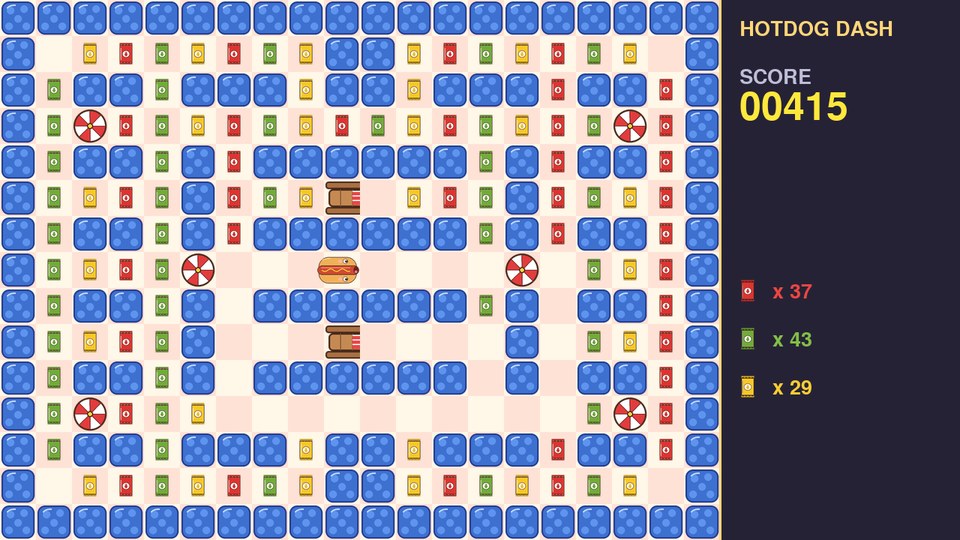
Episode 3 ends with this: every open lane is full of sauce packets in three flavors, the hotdog eats the ones it runs over and the score goes up (ketchup 10, relish 15, mustard 20), a panel counts how many of each flavor are left, the mouth chomps while the hotdog runs, and when the last packet is gone the maze fills up again.

You will need: your project from episode 2 (a game.py, an art folder and the .venv), or the starter files below.
You will make: a dictionary of packets, an eat method, a score and the panel for it.
You will learn: a dictionary with a tuple as its key, f-strings with number formatting, and a simple animation driven by a clock.
Starter files: hotdog-dash-ep02.zip is where this episode begins, hotdog-dash-ep03.zip is where it ends. Both have the art folder.

The code of each step was run headless on Python 3.12 and pygame 2.6.1, and what it does is described below. Indentation matters in Python: the new lines on this page keep the indentation they need, so copy it exactly.
Where we start
Open a terminal, go to the project, turn on the virtual environment and run the game:

$ cd hotdog-dash
$ source .venv/bin/activate
(.venv) $ python game.py

The hotdog from episode 2 runs the empty maze. The file is 175 lines. This episode adds three constants, a handful of methods to Game and a little to Hotdog.
Step 1: packets in the maze
Every dot of the maze (the . characters) is a packet. We keep the packets in a dictionary: the key is the tile, a (column, row) pair, and the value is the flavor. Looking up whether a tile holds a packet is then one operation, and eating one is deleting its entry. Make these changes to game.py:

Add this after line 39 of your file (CORNER_SLACK = 14  # pixels: a turn pressed this soon after a junction still takes the corner)

TEXT_COLOR = (255, 232, 60)  # yellow: easy to read on the blue hedges, the cream floor and the dark panel
FLAVORS = ["ketchup", "relish", "mustard"]
PACKET_SCORE = {"ketchup": 10, "relish": 15, "mustard": 20}
FLAVOR_COLORS = {"ketchup": (235, 70, 65), "relish": (130, 190, 70), "mustard": (250, 205, 50)}

- - -

Add this after line 126 of your file (self.player = Hotdog())

        self.score = 0
        self.packets = {}
        self.fill_packets()

    def fill_packets(self):
        self.packets = {}
        for row, line in enumerate(MAZE):
            for col, char in enumerate(line):
                if char == ".":
                    self.packets[(col, row)] = FLAVORS[(row * 3 + col) % 3]

- - -

Add this after line 150 of your file (surf.blit(IMG["table"], (col * TILE, row * TILE)))

        for (col, row), flavor in self.packets.items():
            image = IMG[f"packet_{flavor}"]
            surf.blit(image, image.get_rect(center=tile_center(col, row)))

What is new:

TEXT_COLOR                  yellow, used for the score and later the banners: it reads well on the blue hedges, the cream floor and the dark panel
FLAVORS, PACKET_SCORE       the three flavor names, and what each is worth. Names are also part of the picture file names: packet_ketchup.png
FLAVOR_COLORS               a color for each flavor, for the panel's counters
self.packets = {}           the dictionary. packets[(5, 3)] = "relish" means there is a relish packet on column 5, row 3
fill_packets                goes through every character of every row and puts a packet on each dot. (row * 3 + col) % 3 picks the flavor: it walks 0, 1, 2 along a row, so the flavors are mixed evenly. This is the same maze loop as draw_maze
for (col, row), flavor in self.packets.items()    a dictionary loop that unpacks the key pair and the value in one go
f"packet_{flavor}"          the picture name is built from the flavor
tile_center                 the helper from episode 2: a packet sits in the middle of its tile

Run it:

(.venv) $ python game.py

The maze is full of small sauce packets in three colors, and the hotdog runs through them without touching them, because nothing eats yet. (Checked: 139 packets at the start, 51 ketchup, 52 relish and 36 mustard, and none on the hotdog's own start tile. Eating them all is worth 2010 points.)
Step 2: eat and score
Eating happens when the hotdog arrives on a tile: the arrived flag from episode 2, which is true for one frame per tile. That means one packet is eaten once, never twice, and never in the middle of a lane. Make these changes:

Add this after line 128 of your file (self.font = pygame.font.Font(None, 40))

        self.score_font = pygame.font.Font(None, 76)

- - -

Add this after line 151 of your file (self.player.steer(*KEYS[event.key]))

    def eat(self, col, row):
        flavor = self.packets.pop((col, row), None)
        if flavor:
            self.score += PACKET_SCORE[flavor]
        if not self.packets:
            self.fill_packets()

- - -

Add this after line 153 of your file (self.player.update(dt))

        if self.player.arrived:
            self.eat(self.player.col, self.player.row)

- - -

Add this after line 172 of your file (surf.blit(self.font.render("HOTDOG DASH", True, (255, 214, 120)), (MAZE_W + 26, 26)))

        surf.blit(self.font.render("SCORE", True, (190, 190, 215)), (MAZE_W + 26, 90))
        surf.blit(self.score_font.render(f"{self.score:05d}", True, TEXT_COLOR), (MAZE_W + 26, 118))
        for i, flavor in enumerate(FLAVORS):
            y = 372 + i * 64
            surf.blit(IMG[f"packet_{flavor}"], (MAZE_W + 26, y))
            left = sum(1 for f in self.packets.values() if f == flavor)
            surf.blit(self.font.render(f"x {left}", True, FLAVOR_COLORS[flavor]), (MAZE_W + 70, y + 4))

What is new:

self.packets.pop(key, None)  removes the entry and gives back its value. If there is no entry, it gives back None instead of an error
if flavor:                   a flavor name is true, None is false: so this runs only when there was a packet
self.score += PACKET_SCORE[flavor]    look up what this flavor is worth
if not self.packets:         an empty dictionary is false. When the last packet is gone, fill the maze again. Episode 8 turns this into a proper level clear
f"{self.score:05d}"          the score as a five-digit number with leading zeros: 00350. The 05d means pad with zeros to width 5, as a whole number
score_font                   a bigger font for the score, size 76
draw_panel                   the heading SCORE, the number, and then one line for each flavor: its picture, and 'x 51' for how many are left. The count is a sum over the dictionary's values

Run it:

(.venv) $ python game.py

Run along a lane and the packets disappear as the hotdog arrives on them, the score goes up and the counts on the panel go down. (Checked: a hotdog steered round the maze for 20 seconds had eaten 25 packets, the score read 350, and the three counters added up to 114, which is 139 minus 25.)
Step 3: chomp
A hotdog that slides along with its mouth shut looks stiff. The picture folder has three frames: mouth closed, half open and wide open. Cycle through them while the hotdog runs. Make these changes:

Add this after line 74 of your file (self.arrived = False)

        self.clock = 0

- - -

Add this after line 112 of your file (left = 0)

        if self.target is not None:
            self.clock += dt

- - -

Replace line 115

        frame = 0

with

        frame = [0, 1, 2, 1][int(self.clock * 12) % 4]

What is new:

self.clock                  a stopwatch the hotdog keeps. It only counts up while the hotdog is moving (target is not None), so the mouth stops when the hotdog stops
int(self.clock * 12) % 4    12 steps a second, cut to the numbers 0, 1, 2, 3 by the remainder. % is the remainder after division
[0, 1, 2, 1][...]           a list lookup that turns 0, 1, 2, 3 into the frames 0, 1, 2, 1: closed, half, wide, half. The mouth opens and shuts three times a second
IMG[f"hotdog_{frame}"]      the picture for that frame; the game rotates it for the direction in the same line as before

Run it:

(.venv) $ python game.py

The hotdog chomps as it runs and stops chomping when it stops. The whole file after step 3 is also hotdog-dash-ep03.zip.
Episode 3 running (a screenshot of the finished step).
Tuning the feel
The feel is in a few numbers:

PACKET_SCORE                what each flavor is worth. Try making mustard worth 50 and see where the player runs
12 in clock * 12            how fast the mouth chomps
row * 3 + col               change the 3 to 2 or 5 and the flavors form a different pattern of stripes in the maze

The levels in episode 8 start from this maze every time, so the number of packets, 139, is how long a level takes. We will measure that when we tune.
Try it yourself
Three small changes before episode 4:

1  Make a new flavor. Add "BBQ" to the lists (you need to draw packet_bbq.png: copy another picture and change its colors).
2  Make the packets worth double when the score is over 1000. (Hint: where is the score added?)
3  Show the total number of packets left, next to the three counters.

Episode 4 adds the danger: a gull that flies over the maze.
Check your work
If something is different:

KeyError: 'packet_ketchup'                   the art folder is missing the packets: use the starter zip
NameError: name 'FLAVORS' is not defined     the constants go near the top, above the classes
AttributeError: 'Game' object has no attribute 'score_font'   the score_font line is missing in __init__
the score never goes up                      eat() is not called: the 'if self.player.arrived' lines go in Game.update after the hotdog's update
the mouth never moves                        the clock line goes inside Hotdog.update at the end, and frame uses self.clock

Not run in the lab: other Linux distributions, Wayland-only sessions and pygame older than 2.6. The numbers in the checks come from running each stage at 60 frames per second.