A hotdog that runs the maze: tile-based movement, a turn that waits for the next junction, and a corner that forgives you. Two small steps, each one run before it was written down.
▶Prefer to watch? This short video runs this page's main commands on a real Ubuntu 24.04 desktop, with on-screen captions and a synthetic voiceover (an AI voice trained on the author's own recording). Click to play, or watch it on YouTube.
Episode 2 ends with this: you press an arrow key and the hotdog runs down the lane in that direction, keeps running until it meets a hedge, turns at the next junction when you ask, can turn right round in the middle of a lane, and turns a corner you pressed a moment too late. It faces the way it runs. Nothing to eat yet; that is episode 3.

You will need: your project from episode 1 (a game.py, an art folder and the .venv), or the starter files below.
You will make: a Hotdog class, a function that says which tiles are open, and the key handling.
You will learn: why a maze game moves tile by tile instead of pixel by pixel, a position and a target, and how a little forgiveness makes a game feel good.
Starter files: hotdog-dash-ep01.zip is where this episode begins, hotdog-dash-ep02.zip is where it ends. Both have the art folder.

The code of each step was run headless on Python 3.12 and pygame 2.6.1, and what it does is described below.
Where we start
Open a terminal, go to the project, turn on the virtual environment and run the game:

$ cd hotdog-dash
$ source .venv/bin/activate
(.venv) $ python game.py

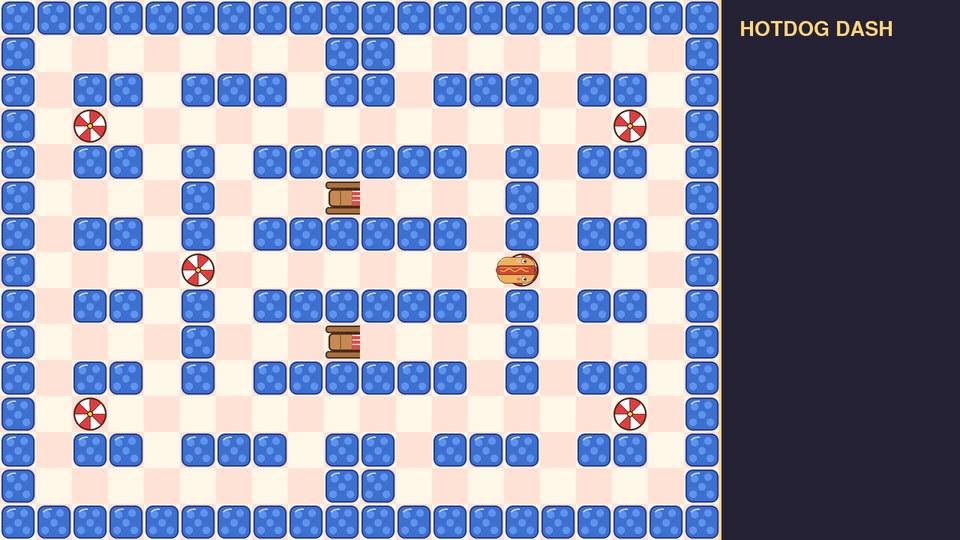
The maze, the panel and the hotdog standing still in the middle. The file is 98 lines. We add one class, Hotdog, between load_images and Game, and change Game in four places.
Why tiles
In a maze, the walls are on a grid, and the hotdog should line up with it. If it moved a pixel at a time in any direction, you would have to test every pixel against every wall, and it would be easy to get stuck on a corner. Instead the hotdog always walks from the middle of one tile to the middle of the next. At any moment it has a tile it is leaving, a tile it is walking to (the target), and a position in between. All decisions are made when it reaches a tile centre.

The speed is 200 pixels a second. A tile is 48 pixels, so crossing a tile takes 48 / 200 = 0.24 seconds, a quarter of a second.
Step 1: a hotdog in the maze
First the class, with a place to stand, and the code that draws it. Make these changes to game.py:

Add this after line 35 of your file (MAZE_W, MAZE_H = COLS * TILE, ROWS * TILE)

HOTDOG_SPEED = 200  # pixels per second, so a tile takes a quarter of a second
KEYS = {pygame.K_LEFT: (-1, 0), pygame.K_RIGHT: (1, 0), pygame.K_UP: (0, -1), pygame.K_DOWN: (0, 1)}
FACING = {(1, 0): 0, (0, -1): 90, (-1, 0): 180, (0, 1): 270}  # degrees, counter-clockwise
CORNER_SLACK = 14  # pixels: a turn pressed this soon after a junction still takes the corner

- - -

Add this after line 40 of your file (return {p.stem: pygame.image.load(p).convert_alpha() for p in ART.glob("*.png")})

def tile_center(col, row):
    return pygame.Vector2(col * TILE + TILE / 2, row * TILE + TILE / 2)


def is_open(col, row):
    """Can the hotdog stand on this tile? Everything inside the maze except a hedge."""
    return 0 <= col < COLS and 0 <= row < ROWS and MAZE[row][col] != "#"


class Hotdog:
    def __init__(self):
        self.reset()

    def reset(self):
        for row, line in enumerate(MAZE):
            if "H" in line:
                self.col, self.row = line.index("H"), row
        self.pos = tile_center(self.col, self.row)
        self.dir = (0, 0)  # the way it is going
        self.want = (0, 0)  # the way the player last asked for, applied at the next junction
        self.target = None  # the tile it is walking to
        self.facing = 0
        self.arrived = False

    def tile(self):
        return int(self.pos.x // TILE), int(self.pos.y // TILE)

    def steer(self, dx, dy):
        self.want = (dx, dy)
        if self.target is not None and self.dir == (-dx, -dy):  # turning right round is always allowed
            self.col, self.row, self.target = self.target[0], self.target[1], (self.col, self.row)
            self.dir = (dx, dy)
        elif self.target is not None and self.dir not in ((dx, dy), (-dx, -dy)) and is_open(self.col + dx, self.row + dy):
            if self.pos.distance_to(tile_center(self.col, self.row)) < CORNER_SLACK:  # just missed the junction: go back to it and turn
                self.pos = tile_center(self.col, self.row)
                self.target = None

    def update(self, dt):
        self.arrived = False
        left = HOTDOG_SPEED * dt
        while left > 0:
            if self.target is None:
                if self.want != (0, 0) and is_open(self.col + self.want[0], self.row + self.want[1]):
                    self.dir = self.want
                elif not is_open(self.col + self.dir[0], self.row + self.dir[1]):
                    self.dir = (0, 0)
                if self.dir == (0, 0):
                    break
                self.target = (self.col + self.dir[0], self.row + self.dir[1])
                self.facing = FACING[self.dir]
            goal = tile_center(*self.target)
            gap = goal - self.pos
            if gap.length() <= left:
                left -= gap.length()
                self.pos = goal
                self.col, self.row = self.target
                self.target = None
                self.arrived = True
            else:
                self.pos += gap.normalize() * left
                left = 0

    def draw(self, surf):
        frame = 0
        name = f"hotdog_{frame}"
        image = pygame.transform.rotate(IMG[name], self.facing)
        surf.blit(image, image.get_rect(center=self.pos))

- - -

Add this after line 51 of your file (self.running = True)

        self.player = Hotdog()

- - -

Replace line 83

        surf.blit(IMG["hotdog_0"], IMG["hotdog_0"].get_rect(center=(9 * TILE + TILE // 2, 7 * TILE + TILE // 2)))

with

        self.player.draw(surf)

What is new:

HOTDOG_SPEED = 200          pixels per second. Movement is speed times dt, the same pattern as every moving thing in the series
KEYS                        a dictionary from an arrow key to a direction (dx, dy): left is (-1, 0), up is (0, -1). The screen's y axis points down
FACING                      how many degrees to rotate the picture for each direction. The picture faces right, so right is 0, up is 90, left is 180, down is 270
tile_center(col, row)       the pixel position of the middle of a tile, as a pygame.Vector2, a number pair that can be added and scaled
is_open(col, row)           true for anything inside the maze that is not a hedge. Umbrellas and tables are open: the hotdog can walk under them
Hotdog.reset()              looks through MAZE for the row with the H, puts the hotdog on that tile and clears everything else. It is a method of its own, because later the game resets the hotdog after a hit
dir, want, target           dir is the way it is going, want is the way the player last asked for, target is the tile it is walking to (None when it is standing on a tile)
pygame.transform.rotate     turns a copy of the picture by the facing angle. The original is never changed
image.get_rect(center=...)  the same centring trick as in episode 1

How the two methods work, because they are the heart of the game:

steer(dx, dy), called when an arrow key goes down:

self.want = (dx, dy)          remember what the player asked for, always
turning right round           if the hotdog is walking a lane and the key points the opposite way, it swaps its tile and target and goes back at once. Reversing is always allowed, even in the middle of a tile
the corner slack              if the key points sideways, the hotdog does not turn yet: that happens at the next tile centre. But if it passed the junction less than CORNER_SLACK = 14 pixels ago and the way is open, it snaps back to the junction tile and turns there. 14 / 200 = 0.07 seconds is a tiny window, and exactly the feel of a corner that forgives a late press

update(dt), called every frame:

left = SPEED * dt             how far it may move this frame
while left > 0                a loop, because a frame can be long enough to cross a tile centre and carry on into the next tile
if self.target is None        standing on a tile: take the wanted direction if it is open, else carry on straight if that is open, else stop (dir = (0, 0))
gap = goal - pos              the vector from where it is to where it is going
if gap.length() <= left       it arrives: put it exactly on the centre, remember the tile, set arrived = True and carry on with what is left of the move
else pos += gap.normalize() * left    otherwise move a bit along the gap. normalize() makes the vector length 1

arrived is True for the one frame in which the hotdog reaches a tile centre. Episode 3 uses it to eat packets exactly once per tile.

Run it:

(.venv) $ python game.py

The hotdog stands on the H tile in the middle, the way it did before, but now it is drawn by the Hotdog class, and the arrow keys do nothing yet. (Checked: after five seconds the hotdog was still on tile column 9, row 7.)
Step 2: steering
Nothing calls the class yet, so connect it. Two changes in Game: tell the hotdog what the keys say, and let it move every frame. Make these changes:

Add this after line 134 of your file (self.running = False)

                elif event.key in KEYS:
                    self.player.steer(*KEYS[event.key])

- - -

Replace line 137

        pass

with

        self.player.update(dt)

Run it:

(.venv) $ python game.py

The two calls are all that was missing. Press an arrow key and the hotdog runs. It keeps going until a hedge stops it. Press another direction while it runs: it turns at the next junction. Press the opposite direction: it turns round at once. Press a turn just after you passed a junction: it still takes it. (Checked in the lab: from the start tile, one press of the right arrow ran the hotdog nine tiles to the right-hand wall in 2.2 seconds, which is 0.24 seconds a tile. Then 60 seconds of random arrow presses, 600 checks: the hotdog was never inside a hedge tile.)
Episode 2 running (a screenshot of the finished step).
Tuning the feel
The feel of the hotdog is in two numbers:

HOTDOG_SPEED = 200      faster is harder, slower is easier. Try 160 and 260
CORNER_SLACK = 14       0 makes every corner exact and unforgiving, 24 makes it very kind. Try both

Everything else (the seagulls in episode 4 and later) is built on the fact that the hotdog's speed is steady, so do not change the speed after episode 4 without playing the whole game again.
Try it yourself
Three small changes before episode 3:

1  Change CORNER_SLACK to 0 and try to take a corner. Then to 30. Which do you like?
2  Make the hotdog start in a different tile: change the maze, and watch reset find the new H.
3  Make the hotdog face up when it stands still. (Hint: where is facing last set?)

Episode 3 fills the maze with packets and teaches the hotdog to eat them.
Check your work
If something is different:

NameError: name 'KEYS' is not defined            the KEYS and FACING lines have to be above class Hotdog, with the other constants
TypeError: steer() takes 3 positional arguments  the call is self.player.steer(*KEYS[event.key]): the star unpacks the pair into dx and dy
the hotdog does not move                         self.player.update(dt) is missing from Game.update
the hotdog goes through a hedge                  is_open must test MAZE[row][col] != "#"
the hotdog faces the wrong way                   FACING angles are counter-clockwise: right 0, up 90, left 180, down 270

Not run in the lab: other Linux distributions, Wayland-only sessions and pygame older than 2.6. The numbers in the checks come from running each stage at 60 frames per second.