A window, a maze made of text, and a hotdog waiting at the start. Real commands, real output, on Ubuntu 24.04.
▶Prefer to watch? This short video runs this page's main commands on a real Ubuntu 24.04 desktop, with on-screen captions and a synthetic voiceover (an AI voice trained on the author's own recording). Click to play, or watch it on YouTube.
Hotdog Dash: a hungry hotdog runs round a picnic maze eating ketchup, relish and mustard packets, while seagulls swoop in from above. We build it in nine short episodes.
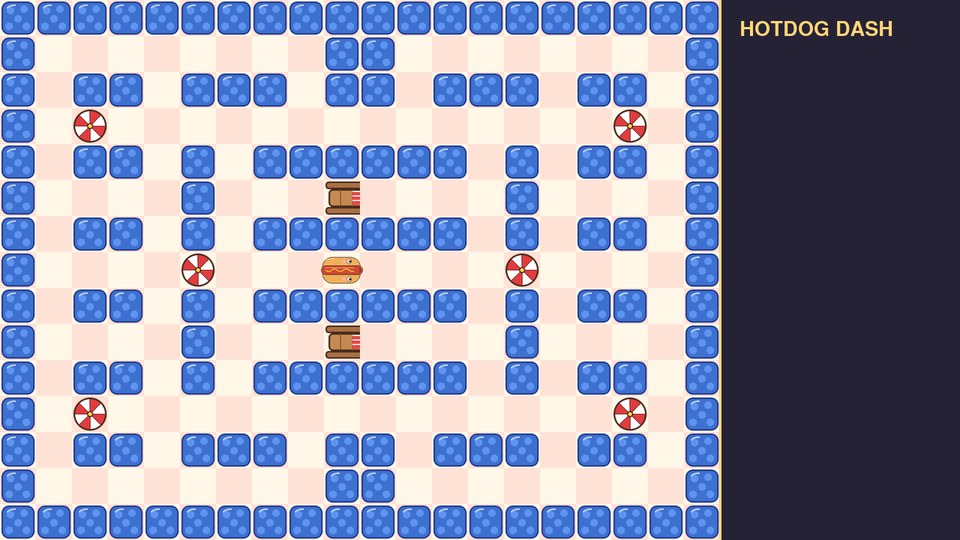
Episode 1 ends with this: a 1280x720 window, a maze of blue hedges, umbrellas and picnic tables drawn from a list of text rows, a side panel, and the hotdog standing at the start. Esc quits.

You will need: Ubuntu 24.04 with a desktop, and a terminal. No pygame, no Python packages, nothing else.
You will make: one file, game.py, and a picture folder called art.
You will learn: a virtual environment, the game loop, a maze stored as text, and how to draw it tile by tile.
Starter files: hotdog-dash-ep01.zip has the art folder and the finished game.py of this episode.

The setup commands and their output on this page are from a freshly installed Ubuntu 24.04 desktop (Python 3.12.3, pygame 2.6.1), the same clean machine as Burger Blaster episode 1. The game code of each step was run headless, and what it does is described below.
What we are making
The whole series, in one line each:

1  The maze                    (this page)
2  Run, hotdog, run
3  Packets to eat
4  A gull overhead
5  The dive
6  Hide under the umbrella
7  Hot sauce
8  Levels, sound and music
9  Ship it: a launcher and a .deb

Each episode starts from the finished code of the one before, and the zip of each episode is a complete, working game. If you skip an episode, download its zip and carry on.

The game is a maze chase in the style of the arcade classics, with one twist that gives the flat 2D picture a third direction: the danger comes from above. A gull circles high over the maze. You only see its shadow, then a red ring on the tiles it is about to hit, and then it dives. All the pictures were drawn for this project with a Python script, the sound effects are made with Python, and the music is an original loop. Nothing is borrowed.
Make a project folder
$ mkdir -p hotdog-dash
$ cd hotdog-dash
$ python3 --version
Python 3.12.3

Python 3.12 is what Ubuntu 24.04 ships. Any 3.10 or newer works the same.
A virtual environment, and the error you will probably get
A virtual environment is a folder that holds the Python packages of one project, so installing pygame here does not touch the rest of your system. Ubuntu makes it with the venv module:

$ python3 -m venv .venv
The virtual environment was not created successfully because ensurepip is not
available.  On Debian/Ubuntu systems, you need to install the python3-venv
package using the following command.

    apt install python3.12-venv

You may need to use sudo with that command.  After installing the python3-venv
package, recreate your virtual environment.

Failing command: /home/ubuntu/burger-blaster/.venv/bin/python3

That is a clean Ubuntu: the venv module is split into its own package and is not installed by default. The message tells you the fix:

$ sudo apt install python3-venv
Setting up python3.12-venv (3.12.3-1ubuntu0.17) ...
Setting up python3-venv (3.12.3-0ubuntu2.1) ...

Running kernel seems to be up-to-date.

No services need to be restarted.

No containers need to be restarted.

No user sessions are running outdated binaries.

No VM guests are running outdated hypervisor (qemu) binaries on this host.

(Shortened to the last lines: apt also printed the package list and the download progress.) Now it works, and prints nothing when it does:

$ python3 -m venv .venv
$ ls -a
.
..
.venv

Turn the environment on. The prompt gets a (.venv) in front, and from now on python and pip mean the ones inside .venv:

$ source .venv/bin/activate
(.venv) $ which python
/home/ubuntu/burger-blaster/.venv/bin/python
Install pygame
pygame is the library that gives us the window, the keyboard, the pictures and the sound:

(.venv) $ pip install pygame
Collecting pygame
  Downloading pygame-2.6.1-cp312-cp312-manylinux_2_17_x86_64.manylinux2014_x86_64.whl.metadata (12 kB)
Downloading pygame-2.6.1-cp312-cp312-manylinux_2_17_x86_64.manylinux2014_x86_64.whl (14.0 MB)
   ━━━━━━━━━━━━━━━━━━━━━━━━━━━━━━━━━━━━━━━━ 14.0/14.0 MB 28.1 MB/s eta 0:00:00
Installing collected packages: pygame
Successfully installed pygame-2.6.1
(Shortened to the last lines.)

Check that it imports. It prints its own version banner, then the number we asked for:

(.venv) $ python -c "import pygame; print(pygame.version.ver)"
pygame 2.6.1 (SDL 2.28.4, Python 3.12.3)
Hello from the pygame community. https://www.pygame.org/contribute.html
2.6.1

pygame 2.6.1 was the current release when this was written. The code in this series does not use anything new, so 2.5 and later will do.
Step 1: the smallest window
Make a file called game.py and put this in it. It is the whole skeleton of the game: one class with a method for each job, and a loop that runs them 60 times a second.

#!/usr/bin/env python3
"""Hotdog Dash: a hotdog eats condiment packets in a picnic maze while seagulls swoop in from above."""
import sys

import pygame

WIDTH, HEIGHT = 1280, 720
FPS = 60


class Game:
    def __init__(self):
        pygame.init()
        pygame.display.set_caption("Hotdog Dash")
        self.screen = pygame.display.set_mode((WIDTH, HEIGHT))
        self.clock = pygame.time.Clock()
        self.running = True

    def handle_events(self):
        for event in pygame.event.get():
            if event.type == pygame.QUIT:
                self.running = False
            elif event.type == pygame.KEYDOWN:
                if event.key == pygame.K_ESCAPE:
                    self.running = False

    def update(self, dt):
        pass

    def draw(self):
        surf = self.screen
        surf.fill((60, 120, 60))
        pygame.display.flip()

    def run(self):
        while self.running:
            dt = self.clock.tick(FPS) / 1000
            self.handle_events()
            self.update(dt)
            self.draw()
        pygame.quit()


if __name__ == "__main__":
    Game().run()
    sys.exit(0)

What each part does:

pygame.init()              start pygame's modules
set_mode((1280, 720))      open a window 1280 pixels wide and 720 tall, and give back its drawing surface
set_caption               the title in the title bar
Clock, tick(FPS)           waits until 1/60 s has passed since the last frame, and returns how many milliseconds that really was
/ 1000                     we want seconds, so dt is the time of this frame in seconds (about 0.0167)
handle_events              input: every key press and click since the last frame. Esc and the close button stop the loop
update(dt)                 move things, by speed times dt, so they move at the same speed on any computer. Empty for now
draw                       paint the frame. fill gives the whole window one colour, (red, green, blue), and display.flip() shows it
if __name__ == "__main__"  run the game only when the file is run directly, so later we can import it for testing

Run it:

(.venv) $ python game.py

A plain green window opens. Press Esc or click the close button and the program ends. That is a complete pygame program, and every game we write is this loop with more in it. (Checked: it ran for 60 frames and closed with Esc, exit status 0.)
Step 2: a maze made of text
Put the art folder next to game.py (it is in the zip). It holds the pictures for the whole series as PNG files with transparent backgrounds: the hotdog, the packets, the gull and its shadow, the hedge, the umbrella, the picnic table, the floor tiles. Now change the file to this:

#!/usr/bin/env python3
"""Hotdog Dash: a hotdog eats condiment packets in a picnic maze while seagulls swoop in from above."""
import sys
from pathlib import Path

import pygame

WIDTH, HEIGHT = 1280, 720
FPS = 60
TILE = 48
HERE = Path(__file__).resolve().parent
ART = HERE / "art"

# The maze is a list of strings, one per row of tiles.
#   #  hedge    .  packet    U  umbrella    T t  picnic table (two tiles)    S  hot sauce    H  where the hotdog starts
MAZE = [
    "####################",
    "#S.......##.......S#",
    "#.##.###.##.###.##.#",
    "#.U..............U.#",
    "#.##.#.######.#.##.#",
    "#....#...Tt...#....#",
    "#.##.#.######.#.##.#",
    "#....U...H....U....#",
    "#.##.#.######.#.##.#",
    "#....#...Tt...#....#",
    "#.##.#.######.#.##.#",
    "#.U..............U.#",
    "#.##.###.##.###.##.#",
    "#S.......##.......S#",
    "####################",
]
COLS, ROWS = len(MAZE[0]), len(MAZE)
MAZE_W, MAZE_H = COLS * TILE, ROWS * TILE

IMG = {}


def load_images():
    return {p.stem: pygame.image.load(p).convert_alpha() for p in ART.glob("*.png")}


class Game:
    def __init__(self):
        pygame.init()
        pygame.display.set_caption("Hotdog Dash")
        self.screen = pygame.display.set_mode((WIDTH, HEIGHT))
        self.clock = pygame.time.Clock()
        IMG.update(load_images())
        self.running = True

    def handle_events(self):
        for event in pygame.event.get():
            if event.type == pygame.QUIT:
                self.running = False
            elif event.type == pygame.KEYDOWN:
                if event.key == pygame.K_ESCAPE:
                    self.running = False

    def update(self, dt):
        pass

    def draw_maze(self, surf):
        for row, line in enumerate(MAZE):
            for col, char in enumerate(line):
                surf.blit(IMG[f"floor_{(row + col) % 2}"], (col * TILE, row * TILE))
                if char == "#":
                    surf.blit(IMG["hedge"], (col * TILE, row * TILE))
                elif char == "U":
                    surf.blit(IMG["umbrella"], (col * TILE, row * TILE))
                elif char == "T":
                    surf.blit(IMG["table"], (col * TILE, row * TILE))

    def draw(self):
        surf = self.screen
        self.draw_maze(surf)
        pygame.display.flip()

    def run(self):
        while self.running:
            dt = self.clock.tick(FPS) / 1000
            self.handle_events()
            self.update(dt)
            self.draw()
        pygame.quit()


if __name__ == "__main__":
    Game().run()
    sys.exit(0)

What is new:

TILE = 48                  the maze is a grid of squares 48 pixels wide. Everything in the game sits on this grid
MAZE = [ ... ]             one string per row of tiles, and one character per tile. # is a hedge, . is a packet (episode 3), U an umbrella, T and t the two halves of a picnic table, S hot sauce (episode 7) and H is where the hotdog starts. Edit the strings and you have a new maze
COLS, ROWS = len(...)      the size of the grid, worked out from the text: 20 columns and 15 rows
MAZE_W, MAZE_H            960 by 720 pixels. The window is 1280 wide, so 320 pixels are left on the right for the score panel
HERE / ART                 the art folder, found next to the game file, wherever you run it from, using pathlib
load_images                reads every PNG in the folder into a dictionary: the file name without .png is the key
.convert_alpha()           converts each picture to the same pixel format as the window, once, so drawing it later is fast and keeps the transparency
enumerate(MAZE)            gives the row number and the string; the inner enumerate gives the column number and the character
IMG[f"floor_{(row + col) % 2}"]   two floor pictures, alternating like a checkerboard, so the floor does not look flat
surf.blit(picture, (x, y)) copy a picture onto the surface with its top-left corner at x, y. Here x is col * TILE and y is row * TILE
elif                       draw the hedge, the umbrella or the table on top of the floor, depending on the character. Packets, the hotdog and the sauce are not drawn yet

Run it:

(.venv) $ python game.py

The window opens with a cream and green checkered floor, a ring of blue hedges round the edge and across the middle, umbrellas in the lanes and two picnic tables in the middle. (Checked: it ran for 60 frames and closed with Esc, exit status 0.)
Step 3: the panel and the hotdog
Two last pieces for this episode: the panel on the right, and the hotdog standing on the H tile. The whole file after step 3, which is also the file in hotdog-dash-ep01.zip:

#!/usr/bin/env python3
"""Hotdog Dash: a hotdog eats condiment packets in a picnic maze while seagulls swoop in from above."""
import sys
from pathlib import Path

import pygame

WIDTH, HEIGHT = 1280, 720
FPS = 60
TILE = 48
HERE = Path(__file__).resolve().parent
ART = HERE / "art"

# The maze is a list of strings, one per row of tiles.
#   #  hedge    .  packet    U  umbrella    T t  picnic table (two tiles)    S  hot sauce    H  where the hotdog starts
MAZE = [
    "####################",
    "#S.......##.......S#",
    "#.##.###.##.###.##.#",
    "#.U..............U.#",
    "#.##.#.######.#.##.#",
    "#....#...Tt...#....#",
    "#.##.#.######.#.##.#",
    "#....U...H....U....#",
    "#.##.#.######.#.##.#",
    "#....#...Tt...#....#",
    "#.##.#.######.#.##.#",
    "#.U..............U.#",
    "#.##.###.##.###.##.#",
    "#S.......##.......S#",
    "####################",
]
COLS, ROWS = len(MAZE[0]), len(MAZE)
MAZE_W, MAZE_H = COLS * TILE, ROWS * TILE

IMG = {}


def load_images():
    return {p.stem: pygame.image.load(p).convert_alpha() for p in ART.glob("*.png")}


class Game:
    def __init__(self):
        pygame.init()
        pygame.display.set_caption("Hotdog Dash")
        self.screen = pygame.display.set_mode((WIDTH, HEIGHT))
        self.clock = pygame.time.Clock()
        IMG.update(load_images())
        self.font = pygame.font.Font(None, 40)
        self.running = True

    def handle_events(self):
        for event in pygame.event.get():
            if event.type == pygame.QUIT:
                self.running = False
            elif event.type == pygame.KEYDOWN:
                if event.key == pygame.K_ESCAPE:
                    self.running = False

    def update(self, dt):
        pass

    def draw_maze(self, surf):
        for row, line in enumerate(MAZE):
            for col, char in enumerate(line):
                surf.blit(IMG[f"floor_{(row + col) % 2}"], (col * TILE, row * TILE))
                if char == "#":
                    surf.blit(IMG["hedge"], (col * TILE, row * TILE))
                elif char == "U":
                    surf.blit(IMG["umbrella"], (col * TILE, row * TILE))
                elif char == "T":
                    surf.blit(IMG["table"], (col * TILE, row * TILE))

    def draw_panel(self, surf):
        pygame.draw.rect(surf, (38, 34, 54), (MAZE_W, 0, WIDTH - MAZE_W, HEIGHT))
        pygame.draw.line(surf, (255, 214, 120), (MAZE_W, 0), (MAZE_W, HEIGHT), 3)
        surf.blit(self.font.render("HOTDOG DASH", True, (255, 214, 120)), (MAZE_W + 26, 26))

    def draw(self):
        surf = self.screen
        self.draw_maze(surf)
        surf.blit(IMG["hotdog_0"], IMG["hotdog_0"].get_rect(center=(9 * TILE + TILE // 2, 7 * TILE + TILE // 2)))
        self.draw_panel(surf)
        pygame.display.flip()

    def run(self):
        while self.running:
            dt = self.clock.tick(FPS) / 1000
            self.handle_events()
            self.update(dt)
            self.draw()
        pygame.quit()


if __name__ == "__main__":
    Game().run()
    sys.exit(0)

What is new:

self.font = Font(None, 40)    pygame's built-in font at size 40, so there is nothing to install
draw_panel                    a dark rectangle for the part of the window right of the maze, a gold line along its left edge and the game's name
font.render(text, True, colour)   makes a picture of the text, and blit puts it on the screen. True turns on smooth edges
IMG["hotdog_0"]               the hotdog picture with its mouth closed. It is drawn from above, with one eye on each half of the bun and the mouth at the front
9 * TILE + TILE // 2          the middle of the tile in column 9: the left edge of the tile plus half a tile. Row 7 the same way. That is the H in the maze
Order matters                 the maze first, the hotdog on top of it, then the panel. Whatever is drawn last is on top

Run it:

(.venv) $ python game.py

The maze with the hotdog in the middle and the panel on the right. Nothing moves, because update is still empty. Esc quits. (Checked: it ran for 60 frames and closed with Esc, exit status 0.)
Episode 1 running (a screenshot of the finished step).
What the dock shows (and why we fix it in episode 9)
The window works, but look at the dock while it is open: it shows a gear with no name, because GNOME does not know that this window belongs to any application. A game started from a terminal with python game.py has no launcher and no icon of its own. Episode 9 gives it a launcher, a menu entry and a proper icon, and packages the whole thing as a .deb. Nothing to do about it now.
Try it yourself
Three small changes, each a line or two. Do them before episode 2:

1  Change a letter in MAZE: turn a # into a . or a U and run it again. Keep every row the same length, or the right-hand edge goes ragged.
2  Move the hotdog: change the centre of the blit. Can you put it on an H of your own by changing the maze, and drawing it where the H is?
3  Change the window caption and the panel title.

Episode 2 teaches the hotdog to run. For that, the empty update(dt) method is where all the work goes.
Check your work
If something is different:

ModuleNotFoundError: No module named 'pygame'   the environment is not active: run source .venv/bin/activate and try again
KeyError: 'hedge'                                the art folder is not next to game.py, or it is empty
pygame.error: No available video device         no desktop session (for example over plain ssh): run it on the desktop, not in a text login
IndexError: string index out of range            a MAZE row is shorter than the first one: check that every row has 20 characters
the window is there but black                    display.flip() is missing, or draw() is not called

Not run in the lab: other Linux distributions, Wayland-only sessions (pygame uses SDL, which can run on either), Python older than 3.12, and pygame older than 2.6.