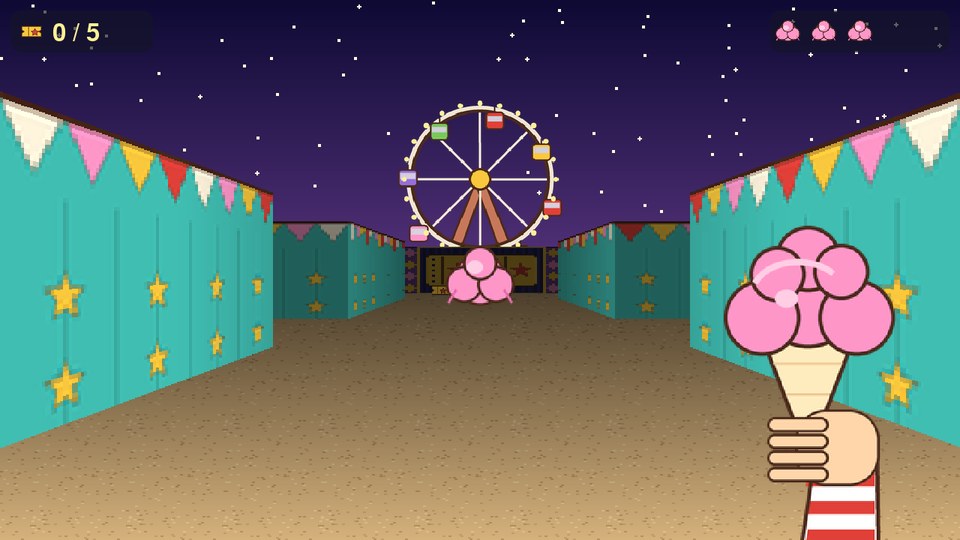
Press Space and a puff of cotton candy flies away from you down the alley, and the hand dips. Run out and go to the candy stand for a refill.
▶Prefer to watch? This short video runs this page's main commands on a real Ubuntu 24.04 desktop, with on-screen captions and a synthetic voiceover (an AI voice trained on the author's own recording). Click to play, or watch it on YouTube.
Episode 6 ends with this: Space throws a puff of cotton candy. It flies straight ahead at head height, getting smaller with distance, and disappears when it hits a wall. You start with three puffs, shown at the top right. Stand next to the pink candy stand and the puffs refill, one every half second, up to five, with a message at the bottom of the screen. The hand drops a little each time you throw.

You will need: your project from episode 5, or the starter files below.
You will make: a Shot class, ammo for the player, a refill function, and a message that fades.
You will learn: a projectile from a position and an angle, a cooldown timer, finding the nearest thing of a kind, and drawing a sprite above the ground.
Starter files: fair-game-ep05.zip is where this episode begins, fair-game-ep06.zip is where it ends. Both have the art folder.

The code of each step was run headless on Python 3.12 with pygame 2.5, and what it does is described below.
Where we start
Open a terminal, go to the project, turn on the virtual environment and run the game:

$ cd fair-game
$ source .venv/bin/activate
(.venv) $ python game.py

The fairground with stands, tickets and a hand, 310 lines. Two steps: first the throwing and the refills, then the screen furniture that shows the ammo, and the hand's kick.
Step 1: throw a puff
Make these changes to game.py:

Add this after line 48 of your file (TICKETS_NEEDED = 5)

SHOT_SPEED, MAX_CANDY = 9.0, 5

- - -

Add this after line 77 of your file (self.walked = 0.0)

        self.candy = 3
        self.recoil = 0.0
        self.refill = 0.0
        self.message, self.message_time = "", 0.0

- - -

Add this after line 95 of your file (self.walked += abs(walk) * SPEED * dt)

        self.recoil = max(0.0, self.recoil - dt)
        self.message_time = max(0.0, self.message_time - dt)

    def say(self, text, seconds=2.5):
        self.message, self.message_time = text, seconds

- - -

Add this after line 142 of your file (for name in ("stand_candy", "stand_soda", "ticket", "ticket_icon", "lamp", "balloons", "ferris_wheel", "hand_candy"):)

        art[name] = pygame.image.load(ART / f"{name}.png").convert_alpha()
    for name in ("shot_candy",):

- - -

Add this after line 250 of your file (player.tickets += 1)

            player.say("A ticket!")


class Shot:
    """A puff of cotton candy flying away from us."""

    def __init__(self, x, y, angle):
        self.x, self.y = x, y
        self.dx, self.dy = math.cos(angle), math.sin(angle)
        self.alive = True

    def update(self, dt):
        self.x += self.dx * SHOT_SPEED * dt
        self.y += self.dy * SHOT_SPEED * dt
        if is_solid(self.x, self.y):
            self.alive = False


def near_stand(player, kind):
    """Are we standing next to a stand of this kind (c = candy, d = soda)?"""
    for ty, row in enumerate(MAP):
        for tx, ch in enumerate(row):
            if ch == kind and math.hypot(tx + 0.5 - player.x, ty + 0.5 - player.y) < 1.8:
                return True
    return False


def refill(player, dt):
    """Next to a stand, the ammo fills up, one puff every half second."""
    player.refill += dt
    if player.refill < 0.5:
        return
    player.refill = 0.0
    if near_stand(player, "c") and player.candy < MAX_CANDY:
        player.candy += 1
        player.say("Fresh cotton candy!")

- - -

Replace line 280

    player, things = Player(), make_things()

with

    player, things, shots = Player(), make_things(), []

- - -

Add this after line 291 of your file (show_map = not show_map)

            elif event.type == pygame.KEYDOWN and event.key == pygame.K_SPACE and player.candy > 0:
                player.candy -= 1
                player.recoil = 0.25
                shots.append(Shot(player.x, player.y, player.angle))

- - -

Add this after line 293 of your file (collect(player, things))

        refill(player, dt)
        for shot in shots:
            shot.update(dt)
        shots = [shot for shot in shots if shot.alive]

- - -

Add this after line 295 of your file (drawables = [(thing.kind, thing.x, thing.y, thing.height, 0.0) for thing in things])

        drawables += [("shot_candy", shot.x, shot.y, 0.25, 0.35) for shot in shots]

What is new:

SHOT_SPEED, MAX_CANDY         9 tiles a second, which is three times as fast as we walk, and at most five puffs
Player.candy                  how many puffs Pip has: three to start
Player.recoil                 a timer for the hand's kick: 0.25 seconds after a throw, counting down to 0
class Shot                    a position, a direction and whether it is still alive. The direction is cos and sin of the angle at which Pip was looking when he threw it: the same pair of numbers that moves Pip
Shot.update(dt)               moves along the direction by speed times dt, as for Pip. If its new position is in a solid tile it is no longer alive. The list of shots is cleaned every frame: shots = [s for s in shots if s.alive]
the Space key                 is a KEYDOWN event, not a held key like walking, because one press should throw one puff. We take one off candy, set the recoil and add a Shot at Pip's position and angle
near_stand(player, kind)      are we within 1.8 tiles of a stand of this kind? It looks through the map for the characters c (candy) or d (soda; the next episode)
refill(player, dt)            every half second, if we are near a candy stand and not full, one more puff. player.refill is the timer
player.say(text)              puts a message on screen for 2.5 seconds. Picking up a ticket says "A ticket!", a refill says "Fresh cotton candy!"
the drawing                   a shot is a sprite like any other: we add it to the list that is sorted by distance. It is 0.25 of a wall tall and lifted 0.35 above the ground, so it flies at about chest height, not along the floor. The lift moves the bottom of the sprite up by lift * HEIGHT / depth

Run it:

(.venv) $ python game.py

Press Space and a small pink puff flies off up the corridor and gets smaller until it hits the far wall. Press it a fourth time: nothing happens, because you started with three. Walk up to the pink candy stand in the plaza and stand next to it for a few seconds, then press Space again: you have puffs again, one for every half second you stood there. You cannot see how many you have yet; the next step adds the panel. (Checked by a script: one press of Space made one shot and used one puff, three presses used all three, a fourth press did nothing, and every shot was gone three seconds later. Standing next to the candy stand, the puffs went from 0 to 2 in one second and the message text was set to "Fresh cotton candy!" (it appears on screen after step 2). It also ran 120 frames and closed normally, exit status 0.)
Step 2: show the ammo, and kick the hand
Make these changes to game.py:

Add this after line 310 of your file (screen.blit(font.render(f"{player.tickets} / {TICKETS_NEEDED}", True, (255, 240, 150)), (70, 28)))

    draw_panel(screen, (WIDTH - 14 - 48 * MAX_CANDY, 14, 48 * MAX_CANDY, 56))
    for i in range(player.candy):
        screen.blit(pygame.transform.scale(art["shot_candy"], (40, 40)), (WIDTH - 10 - 48 * MAX_CANDY + i * 48, 22))
    if player.message_time > 0:
        text = font.render(player.message, True, (255, 255, 255))
        draw_panel(screen, (WIDTH // 2 - text.get_width() // 2 - 16, HEIGHT - 150, text.get_width() + 32, 56))
        screen.blit(text, (WIDTH // 2 - text.get_width() // 2, HEIGHT - 140))

- - -

Replace line 318

    screen.blit(hand, (WIDTH - hand.get_width() - 40, HEIGHT - hand.get_height() + 60 + bob))

with

    screen.blit(hand, (WIDTH - hand.get_width() - 40, HEIGHT - hand.get_height() + 60 + bob + player.recoil * 200))

What is new:

the ammo panel                one small pink puff picture for each puff you have, in a dark panel at the top right. The panel is always MAX_CANDY puffs wide, so you can see the empty places
the message                   when message_time is above zero we make a picture of the text and a panel just wider than it, at the bottom middle. message_time is counted down in Player.update, so the message goes away by itself
the hand's kick               in draw_hand the hand's height gets plus player.recoil * 200 pixels. recoil starts at 0.25, so the hand starts 50 pixels low and slides back up in a quarter of a second. It is a one-line animation and it makes the throw feel like a throw

Run it:

(.venv) $ python game.py

Three puffs in the panel at the top right. Throw one: the hand dips and comes back, the panel shows two. Walk to the candy stand: "Fresh cotton candy!" appears at the bottom and the puffs fill up to five. (Checked: it ran for 120 frames and closed normally, exit status 0.)
Why a timer and not a sleep
Look at how the refill works: a number counts up each frame, and when it passes 0.5 we do the thing and set it back to 0. The recoil works the other way: a number set to 0.25 counts down. The message too.

They are all the same idea, a timer, and a timer is the way to do "wait a bit" in a game. You must not use time.sleep: it stops the whole program, so the window freezes, the keys are not read and the other things stop. A timer is just a variable, so everything else carries on while it counts. Every effect in the rest of the series, a guard stuck to the floor for six seconds or a gate that opens, is a timer.
Episode 6 running (a screenshot of the finished step).
Things to try
Three changes before episode 7:

1  Change SHOT_SPEED to 3, then to 30. At 30 a shot can cross a wall in one frame: why does it not skip over a thin wall? (Think about how far it moves in one frame, and how thick the walls are.)
2  Make the refill every 0.1 seconds. Is the game too easy?
3  Change the 0.35 lift of the shot to 0. Where does the puff fly now?

Episode 7 is the one with the bears.
Check your work
If something is different:

AttributeError: 'Player' object has no attribute 'candy'   the Player.__init__ lines are missing
the puff flies backwards                                   the angle is the wrong way round: use cos for x and sin for y
the puffs never refill                                     refill is not called each frame, or the stand is more than 1.8 tiles away
the message never goes away                                message_time is not counted down in Player.update
Space throws a stream of puffs                             the Space test is on the held keys, not on a KEYDOWN event

Not run in the lab: very high shot speeds on very thin walls, and a controller trigger in place of the Space bar.