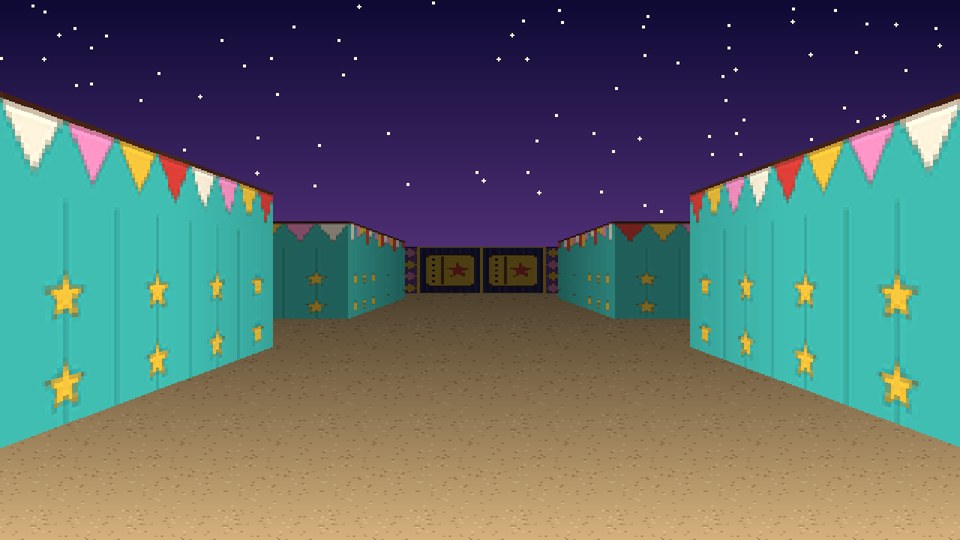
Flat colours become red-and-cream tents, teal stalls with bunting, a ticket gate and a starry sky. Each strip is one pixel-wide column of a picture, stretched.
▶Prefer to watch? This short video runs this page's main commands on a real Ubuntu 24.04 desktop, with on-screen captions and a synthetic voiceover (an AI voice trained on the author's own recording). Click to play, or watch it on YouTube.
Episode 4 ends with this: the same walk-about 3D view as episode 3, but the walls are pictures: striped tents, teal stall walls with painted stars and bunting, purple panels, a wooden fence and a navy-and-gold ticket gate at the end of the corridor. The sky is a night sky with stars, the ground is sawdust, and everything gets darker with distance.

You will need: your project from episode 3, or the starter files below.
You will make: a load_art function, a make_floor function, and a version of render_walls that draws pictures.
You will learn: how to turn the "where did the ray hit the wall" number into a column of a picture, how to scale a column to the height of the strip, shading with a multiply blend, and drawing a background once instead of every frame.
Starter files: fair-game-ep03.zip is where this episode begins, fair-game-ep04.zip is where it ends. The art folder is in the second one.

The code of each step was run headless on Python 3.12 with pygame 2.5, and what it does is described below.
The art folder
So far everything was drawn with squares and lines. From this episode on we need pictures, and from here to the end of the series the game needs an art folder next to game.py. It holds PNG files that were drawn for this project with a Python script: wall textures that are 64 by 64 pixels, the sawdust, the night sky, and all the sprites of later episodes (the stands, the tickets, the guards, Pip's hand). Take it from the zip:

$ cd ~
$ unzip -q ~/Downloads/fair-game-ep04.zip 'fair-game/art/*' -d ~
$ ls fair-game/art | head -8

The listing starts balloons.png, decal_candy.png, decal_soda.png, ferris_wheel.png, floor_sawdust.png, guard_slip.png, guard_stuck.png, guard_walk_a.png. The five wall pictures are called wall_fence.png, wall_tent.png, wall_stall.png, wall_panel.png and wall_gate.png: one per map character, F # S N W.

(The zip has the finished game.py as well. Do not unzip over your own file if you want to type the code yourself: the command above takes only the art folder.)
A wall is a picture seen through a keyhole
Think about what a ray tells us when it hits a wall. We know the wall character, so we know which picture to use. We also know how far along the wall the ray hit, from 0 at the left end of the tile to 1 at the right. That is cast's fourth return value, the one we did not use last episode.

Multiply it by 64, the width of the picture in pixels, and you have the number of the picture's column that this ray is looking at. Take that one-pixel-wide column of the picture, stretch it to the height of the strip and draw it. Next to it the neighbouring ray looks at the neighbouring column, and so on. Side by side, the columns make a picture of the wall, shrunk or stretched by perspective. A wall far away is a few pixels tall, so its picture is squeezed to a few pixels. A wall close up is a few hundred pixels, so the picture is stretched.

pygame does the stretching for us: subsurface cuts a rectangle out of a picture without copying it, and transform.scale resizes it. A column is 1 pixel wide and 64 tall, and we scale it to COLW wide and as tall as the wall is.
Step 1: textures, a floor and a sky
Make these changes to game.py:

Add this after line 4 of your file (import sys)

from pathlib import Path

- - -

Add this after line 9 of your file (FPS = 60)

HERE = Path(__file__).resolve().parent
ART = HERE / "art"

- - -

Replace lines 113-116

def render_walls(screen, player):
    """One vertical strip per ray: the nearer the wall, the taller the strip. Flat colours for now."""
    screen.fill((30, 24, 70), (0, 0, WIDTH, HEIGHT // 2))
    screen.fill((200, 160, 110), (0, HEIGHT // 2, WIDTH, HEIGHT // 2))

with

def make_floor():
    """The ground, drawn once: sawdust that gets darker towards the horizon."""
    sawdust = pygame.image.load(ART / "floor_sawdust.png").convert()
    floor = pygame.Surface((WIDTH, HEIGHT // 2))
    tile = pygame.transform.scale(sawdust, (128, 128))
    for y in range(0, HEIGHT // 2, 128):
        for x in range(0, WIDTH, 128):
            floor.blit(tile, (x, y))
    for y in range(HEIGHT // 2):
        shade = int(255 * (0.3 + 0.7 * y / (HEIGHT // 2)))
        floor.fill((shade, shade, shade), (0, y, WIDTH, 1), special_flags=pygame.BLEND_MULT)
    return floor


def load_art():
    art = {}
    for ch, name in (("F", "wall_fence"), ("#", "wall_tent"), ("S", "wall_stall"), ("N", "wall_panel"), ("W", "wall_gate")):
        art[ch] = pygame.image.load(ART / f"{name}.png").convert()
    art["sky"] = pygame.transform.scale(pygame.image.load(ART / "sky_night.png").convert(), (WIDTH, HEIGHT // 2))
    art["floor"] = make_floor()
    return art


def render_walls(screen, player, art):
    """One vertical strip per ray: the nearer the wall, the taller the strip. Each strip is one column of the wall's picture."""
    screen.blit(art["sky"], (0, 0))
    screen.blit(art["floor"], (0, HEIGHT // 2))

- - -

Replace lines 123-125

        shade = max(0.25, min(1.0, 1.6 / (1 + dist * 0.25))) * (0.75 if side else 1.0)
        color = tuple(int(c * shade) for c in WALL_COLORS[ch])
        screen.fill(color, (col * COLW, (HEIGHT - height) // 2, COLW, height))

with

        tx = int(hit * 64) % 64
        if height > HEIGHT:   # a wall right in front of us: only the middle of the picture is on screen
            part = max(1, int(64 * HEIGHT / height))
            strip = pygame.transform.scale(art[ch].subsurface((tx, (64 - part) // 2, 1, part)), (COLW, HEIGHT))
            top = 0
        else:
            strip = pygame.transform.scale(art[ch].subsurface((tx, 0, 1, 64)), (COLW, height))
            top = (HEIGHT - height) // 2
        shade = int(255 * max(0.25, min(1.0, 1.6 / (1 + dist * 0.25))) * (0.75 if side else 1.0))
        strip.fill((shade, shade, shade), special_flags=pygame.BLEND_MULT)
        screen.blit(strip, (col * COLW, top))

- - -

Add this after line 138 of your file (clock = pygame.time.Clock())

    art = load_art()

- - -

Replace line 152

        render_walls(screen, player)

with

        render_walls(screen, player, art)

What is new:

ART                          the art folder, found next to the game file with pathlib, wherever you run the game from. HERE is the folder game.py is in
make_floor                   draws the ground once and returns it as a picture. The sawdust is tiled over a surface 1280 wide and 360 tall (half the screen), and then every row gets darker the nearer it is to the horizon: a multiply blend with a grey that goes from 0.3 at the top to 1.0 at the bottom. A row of pixels is cheap to fill, and we do it 360 times once at the start, not 360 times a frame
load_art                     loads every picture into one dictionary, with the five wall pictures under the map character they belong to: art["#"] is the tent. convert() makes each picture the same pixel format as the window, once, so drawing it later is fast. The sky is stretched to the top half of the window
render_walls(screen, player, art)  now draws the sky and the floor first, with two blits, in place of the two fill calls
tx = int(hit * 64) % 64      the picture's column. % 64 is a safety net for a hit of exactly 1.0
subsurface((tx, 0, 1, 64))   one column of the picture, 1 pixel wide and 64 tall
scale(..., (COLW, height))   stretched to 4 pixels wide and as tall as the strip
if height > HEIGHT           a wall right in front of you is taller than the window, and stretching a column to 2000 pixels is wasteful. So we take only the middle part of the picture that is on screen (part rows out of 64) and stretch that to the height of the window
strip.fill(..., BLEND_MULT) multiplies every pixel of the strip by a grey: 255 leaves it alone, 64 makes it dark. It is the same distance shading as episode 3, for a picture. Walls that face up or down get 0.75 of it
art = load_art()             once, before the loop. Loading a picture every frame would be very slow

Run it:

(.venv) $ python game.py

A night sky with stars, sawdust on the ground, and the corridor of teal stall walls with painted stars and bunting going away to the navy-and-gold ticket gate at the end. Walk to the left: the fence, a wooden wall; to the right: the red and cream striped tents. All of it gets darker with distance. (Checked: it ran for 120 frames with the up key held and closed normally, exit status 0.)
About the floor
The floor and the sky do not move when you walk. They are painted once as a backdrop and the walls are drawn on top. The walls are what tell you that you are moving, and the corridor is narrow enough that you do not notice. A true textured floor works out which sawdust pixel is under each screen pixel, one calculation for every pixel in the bottom half of the window: about 460,000 of them, 60 times a second. That is fine for a program that can do it in bulk with a library like numpy, but it is too slow in plain Python, and the engine here is meant to be plain pygame so that every line is readable.

If you want it, a good project after the series is to add a floor with numpy and see how much better it looks.
Episode 4 running (a screenshot of the finished step).
Try it yourself
Three changes before episode 5:

1  Replace one of the wall pictures with your own 64 x 64 PNG, with the same name. Walls in your own style.
2  Change the 0.3 in make_floor to 0.7. The ground at the horizon is brighter, and the world looks less like night.
3  Remove the line that fills the strip with the shade. What does the view look like with no distance darkening at all?

Episode 5 puts things in the fairground: stands, lamps, balloons and tickets, and Pip's hand.
Check your work
If something is different:

FileNotFoundError: ... wall_tent.png         the art folder is not next to game.py, or the unzip put it somewhere else
KeyError: 'W'                                load_art is missing one of the five wall pictures
pygame.error: ... subsurface rectangle outside surface area   tx is 64 or more: keep the % 64
the walls look wrong at the edges of a tile  hit is not the fraction from cast: check the return values order
the ground is dark everywhere                the multiply grey in make_floor goes the wrong way: it should be darkest at the top (y = 0)

Not run in the lab: pictures that are not 64 x 64 (the 64 is a number in render_walls), and picture formats other than PNG.