🎡 Fair Game, Episode 2
Pip on the map: a position, a direction he is facing, and keys that turn and walk. He is stopped by walls and slides along them. Still seen from above.
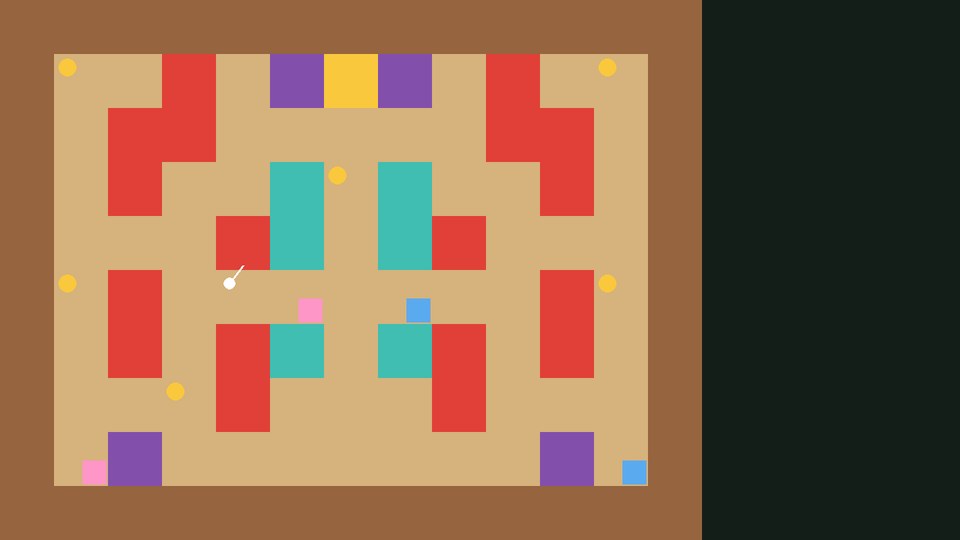
Episode 2 ends with this: a white dot on the map with a short line showing which way it is facing. Left and right turn it, up and down walk it forward and back, and the walls stop it. If you walk into a wall at an angle you slide along it instead of stopping dead.

You will need: your project from episode 1 (a game.py and the .venv), or the starter files below.
You will make: a Player class and a function that says which tiles are solid.
You will learn: an angle and how sine and cosine turn it into a direction, moving by speed times dt, and collision that does not stick.
Starter files: fair-game-ep01.zip is where this episode begins, fair-game-ep02.zip is where it ends.

The code of each step was run headless on Python 3.12 with pygame 2.5, and what it does is described below.
Where we start
Open a terminal, go to the project, turn on the virtual environment and run the game:

$ cd fair-game
$ source .venv/bin/activate
(.venv) $ python game.py

The map in a dark window. The file is 71 lines. We add one class, Player, a few constants and a function, and change main in three places.
An angle and a direction
A first-person game needs to know where you are and which way you are looking. Where is two numbers, x and y, measured in tiles: x = 13.5 is the middle of the 14th column. Which way is one number, an angle in radians.

Radians are what Python's math functions use: a full turn is 2 * pi (about 6.28), half a turn is pi, a quarter turn is pi / 2. Angle 0 points to the right, and because the y axis of a screen points DOWN, angle pi / 2 points down the map and -pi / 2 points up it. Pip starts facing up the map, towards the Ferris wheel, so his angle is -pi / 2.

To walk in the direction of an angle you need the direction as two numbers, how far to go in x and how far in y for each step of length 1:

  dx = math.cos(angle)
  dy = math.sin(angle)

cos and sin give a pair of numbers whose combined length is exactly 1, whatever the angle. Multiply them by a speed and by dt and you have how far to move this frame. That one idea carries the whole series: the raycaster, the thrown cotton candy and the bears' sight lines are all cos and sin of an angle.
Step 1: a player on the map
Make these changes to game.py:

Add this after line 2 of your file ("""Fair Game: sneak through the fairground in first person, stick the teddy-bear guards with cotton candy and ride the Ferris wheel.""")

import math

- - -

Add this after line 34 of your file (])

MAP_W, MAP_H = len(MAP[0]), len(MAP)
START = (13.0, 17.0)
SOLID = "F#SNWcd"   # tiles we cannot walk through

- - -

Add this after line 35 of your file (WALL_COLORS = {"F": (150, 100, 62), "#": (224, 64, 56), "S": (64, 190, 178), "N": (130, 80, 170), "W": (250, 200, 60)})

SPEED, TURN, RADIUS = 3.0, 2.4, 0.25


def is_solid(x, y):
    tx, ty = int(x), int(y)
    if not (0 <= tx < MAP_W and 0 <= ty < MAP_H):
        return True
    return MAP[ty][tx] in SOLID

- - -

Add this after line 49 of your file (pygame.draw.rect(screen, (255, 150, 200) if ch == "c" else (90, 170, 240), (rect[0] + 2, rect[1] + 2, size - 4, size - 4)))

class Player:
    def __init__(self):
        self.x, self.y = START
        self.angle = -math.pi / 2  # facing up the map

    def blocked(self, x, y):
        r = RADIUS
        return is_solid(x - r, y - r) or is_solid(x + r, y - r) or is_solid(x - r, y + r) or is_solid(x + r, y + r)

    def try_move(self, dx, dy):
        # x and y one after the other, so you slide along a wall instead of sticking to it
        if not self.blocked(self.x + dx, self.y):
            self.x += dx
        if not self.blocked(self.x, self.y + dy):
            self.y += dy

    def update(self, dt, keys):
        turn = (keys[pygame.K_RIGHT] or keys[pygame.K_d]) - (keys[pygame.K_LEFT] or keys[pygame.K_a])
        walk = (keys[pygame.K_UP] or keys[pygame.K_w]) - (keys[pygame.K_DOWN] or keys[pygame.K_s])
        self.angle += turn * TURN * dt
        self.try_move(math.cos(self.angle) * walk * SPEED * dt, math.sin(self.angle) * walk * SPEED * dt)

- - -

Add this after line 54 of your file (clock = pygame.time.Clock())

    player = Player()

- - -

Add this after line 62 of your file (running = False)

        player.update(dt, pygame.key.get_pressed())

- - -

Add this after line 64 of your file (draw_map(screen, 36))

        pygame.draw.circle(screen, (255, 255, 255), (int(player.x * 36), int(player.y * 36)), 8)
        pygame.draw.line(screen, (255, 255, 255), (player.x * 36, player.y * 36), (player.x * 36 + math.cos(player.angle) * 30, player.y * 36 + math.sin(player.angle) * 30), 3)

What is new:

import math                  sine, cosine and pi
START = (13.0, 17.0)         where Pip starts, in tiles: the middle of the corridor at the bottom of the map. A tile is x from 13 to 14, so 13.0 is the left edge of the 14th tile, and the two-tile-wide corridor is columns 12 and 13, so 13.0 is its middle
SOLID                        the map characters you cannot walk through: fence, tents, stall walls, panels, the gate and the two stands. The tickets and sawdust are not in it
SPEED, TURN, RADIUS          three tiles a second to walk, 2.4 radians a second to turn (about 137 degrees a second), and a body that is half a tile wide
is_solid(x, y)               true if the point is inside a wall, or outside the map. int() cuts off the decimals, so int(13.5) is 13: the tile that contains the point
Player.blocked(x, y)         would a body of this size, centred at x, y, overlap a wall? It checks the four corners of a square round the centre
Player.try_move(dx, dy)      moves in x, then in y, each only if free. That is why you slide along a wall: if you walk diagonally into a wall that runs up and down, the x move is blocked and the y move is not
Player.update(dt, keys)      reads the keys. (a or b) - (c or d) is +1, -1 or 0: right minus left for turning, up minus down for walking. Then turn * TURN * dt is the change in angle, and the walk is cos and sin of the angle times SPEED * dt
pygame.key.get_pressed()     the keys that are down right now, as an object we index with a key name. Unlike a key event it is true for as long as the key is held, which is what walking needs
The drawing                  a white circle and a line 30 pixels long in the direction of the angle, at x * 36, y * 36: the same 36 pixels per tile as draw_map

Run it:

(.venv) $ python game.py

The map with a small white dot near the bottom and a line pointing up. Left and right swing the line round; up and down move the dot along the way the line points. Walk into a tent: the dot stops at its edge. Walk at it at an angle: the dot slides along it. (Checked: it ran for 120 frames, two seconds, with the up key held. Pip walked about six tiles up the corridor, which is 3 tiles a second times 2 seconds, and the program closed normally, exit status 0.)
Why try_move does x and y separately
The obvious way to do collision is to compute the new position and refuse the move if it is inside a wall. That makes you stick: walk into a wall at an angle and both x and y are refused, and you stop dead, even though you could have slid along the wall.

Moving one axis at a time fixes it. If a move in x is blocked, the move in y is tried by itself, and vice versa. It is two small checks instead of one, and it is the difference between a game that feels like walking and a game that feels like being glued.

The body is half a tile wide (RADIUS 0.25 each side) so that Pip cannot stand with half his body in a wall, and so that a wall right in front of the camera is never so close that the 3D view in the next episode gets strange.
Try it yourself
Three small changes before episode 3:

1  Change SPEED to 6 and TURN to 4. Is it fun, or too twitchy?
2  Change RADIUS to 0.45. Can you still get through the narrow alleys? The alleys are two tiles wide, so what is the biggest radius that fits?
3  Change START to somewhere else in the map. What happens if you start inside a wall?

Episode 3 is the big one: Pip gets eyes, and the 3D view appears.
Check your work
If something is different:

NameError: name 'math' is not defined       the import math line is missing
NameError: name 'player' is not defined     the player = Player() line is missing from main
the dot walks through walls                 is_solid or SOLID is missing a character, or blocked is not used by try_move
the dot only turns, never walks             the walk line is missing, or the arrow keys are not held down: the dot moves only while the key is held
the dot walks the wrong way                 the angle is in degrees, not radians: math.cos and math.sin expect radians

Not run in the lab: a game controller, a mouse look (we turn with the keys only), and a keyboard layout other than a US one for the WASD keys (the arrow keys work on any).