Sound effects, an original fairground waltz, three levels with more and faster bears, a title screen, a clock and a best time that is still there tomorrow.
▶Prefer to watch? This short video runs this page's main commands on a real Ubuntu 24.04 desktop, with on-screen captions and a synthetic voiceover (an AI voice trained on the author's own recording). Click to play, or watch it on YouTube.
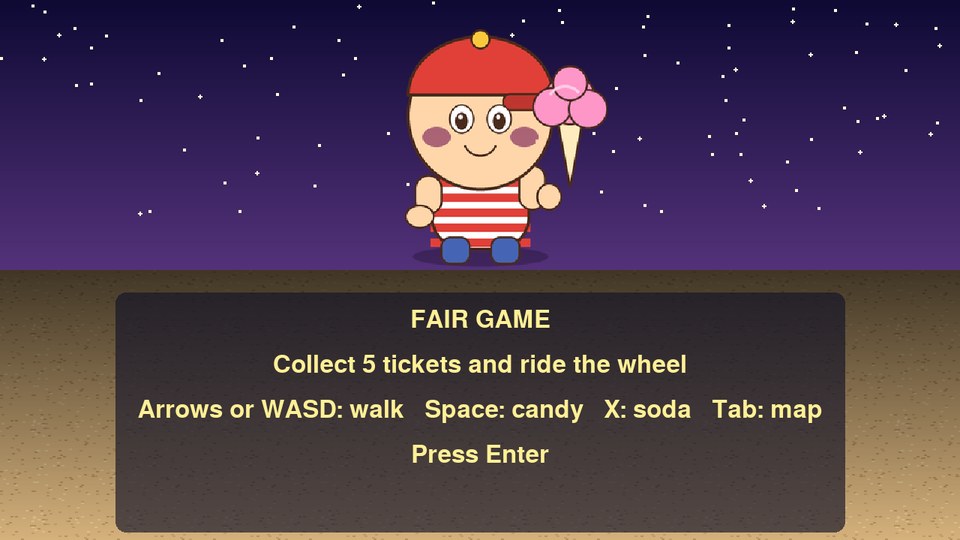
Episode 10 ends with this: the game starts on a title screen with Pip and the controls. Enter starts level 1, with four bears. Throwing, hitting a bear, picking up a ticket, refilling, getting caught, the gate opening and winning all make a sound, and an original little waltz plays under it all. Win a level and Enter takes you to the next one, with more bears that walk and run faster and see further. Win the third and your time is shown with your best time, and the best time is kept in a file so that it is still there the next time you play.

You will need: your project from episode 9, or the starter files below.
You will make: a sound dictionary, a LEVELS table, a title state, a clock and a save file.
You will learn: making sounds with Python's standard library, pygame's mixer, a table that makes a game harder, and saving a small piece of data as JSON.
Starter files: fair-game-ep09.zip is where this episode begins, fair-game-ep10.zip is where it ends. It has the art folder, the sounds and the music, and the make_sounds.py that made them.

The code of each step was run headless on Python 3.12 with pygame 2.5, and what it does is described below.
Where we start
Open a terminal, go to the project, turn on the virtual environment and run the game:

$ cd fair-game
$ source .venv/bin/activate
(.venv) $ python game.py

A whole game with a start and an end, 587 lines, and entirely silent. Two steps: the sound, then the levels, the title and the best time.
Sound made with Python
The game's sounds are not recorded and not taken from anywhere. make_sounds.py, which is in the zip, makes them with the Python standard library alone (the wave module and some arithmetic), and every sound is the same two ingredients:

  a tone      a square wave or a triangle wave, which is a number that goes between -1 and 1 in a pattern, many times a second. How many times a second is the pitch.
  noise       random numbers, smoothed a little, for whooshes and splats

A tone that slides from one pitch to another (a sweep) and fades out is most of a game sound. A throw is noise that grows plus a sweep going up. A splat is noise plus a low sweep going down. A ticket is two short bright notes. The caught sound is a sweep going down, twice, which sounds sad. The gate and the win are arpeggios: the notes of a chord, one after the other, going up.

The music is eight bars of a waltz, 150 beats a minute, 9.6 seconds in all, which loops without a join. It has a bass note on the first beat of each bar and two short chords on the other two (the oom-pah-pah of a fairground organ) and a bright tune on top made of a square wave and a triangle an octave higher. It was written for this game, so it is ours. You can change the notes in the lists at the top of the waltz function and run make_sounds.py again.

Run it once to make the files. It writes seven .wav files into sounds/ and the music into music/loop.wav:

(.venv) $ python make_sounds.py
wrote caught.wav, gate.wav, refill.wav, splat.wav, throw.wav, ticket.wav, win.wav and music/loop.wav

(The zip already has all of them. You only need to run it if you change the script.)
Step 1: sound effects and music
Make these changes to game.py:

Add this after line 3 of your file (import math)

import os

- - -

Add this after line 13 of your file (ART = HERE / "art")

SOUNDS = HERE / "sounds"
MUSIC = HERE / "music" / "loop.wav"
SAVE = Path(os.environ.get("XDG_DATA_HOME", Path.home() / ".local/share")) / "fair-game" / "best.json"

- - -

Add this after line 57 of your file (DECOR = [(6.5, 10.5, "lamp", 1.0), (19.5, 10.5, "lamp", 1.0), (11.5, 4.5, "lamp", 1.0), (14.5, 4.5, "lamp", 1.0), (3.5, 3.5, "balloons", 0.8), (22.5, 3.5, "balloons", 0.8), (6.5, 15.5, "balloons", 0.8), (19.5, 15.5, "balloons", 0.8)])

SOUND = {}


def sfx(name):
    if name in SOUND:
        SOUND[name].play()

- - -

Add this after line 275 of your file (player.say("A ticket!"))

            sfx("ticket")

- - -

Add this after line 311 of your file (player.say("Fresh cotton candy!"))

        sfx("refill")

- - -

Add this after line 314 of your file (player.say("Fizzy soda!"))

        sfx("refill")

- - -

Add this after line 511 of your file (pygame.init())

    try:
        pygame.mixer.init()
        for name in ("throw", "splat", "ticket", "refill", "caught", "gate", "win"):
            SOUND[name] = pygame.mixer.Sound(SOUNDS / f"{name}.wav")
        pygame.mixer.music.load(MUSIC)
        pygame.mixer.music.set_volume(0.5)
        pygame.mixer.music.play(-1)
    except pygame.error:
        pass   # no sound card: play without sound

- - -

Add this after line 534 of your file (shots.append(Shot(player.x, player.y, player.angle)))

                    sfx("throw")

- - -

Add this after line 540 of your file (shots.append(shot))

                    sfx("throw")

- - -

Replace line 550

                hit_bears(shot, bears)

with

                if hit_bears(shot, bears):
                    sfx("splat")

- - -

Add this after line 557 of your file (player.say("Caught! Back to the entrance."))

                sfx("caught")

- - -

Add this after line 562 of your file (player.say("The gate is open! Run to the wheel!", 4.0))

                sfx("gate")

What is new:

import os                      for the folder the best time is saved in (step 2)
SOUNDS, MUSIC, SAVE            where the sound files, the music and the best-time file are
SOUND, sfx(name)               a dictionary of loaded sounds, and a function that plays the one with this name. If a name is not in the dictionary, nothing happens. That is a feature: if the sounds could not be loaded, the calls do nothing and the game still plays
pygame.mixer.init()            starts pygame's sound. We load all seven effects with mixer.Sound, and start the music with mixer.music, set to half volume, and play(-1) means loop for ever
try ... except pygame.error    a computer without a sound card (or a remote session) makes mixer.init fail. We catch that and play without sound, rather than crash
the sfx calls                  one line each, at the moment each thing happens: throw (Space and X), splat (a hit), ticket, refill, caught, gate

Run it:

(.venv) $ python game.py

Music starts. Throw a puff: a whoosh. Pick up a ticket: a ding. (Checked headless with a dummy sound driver: the game loaded all seven effects and the music, and ran 120 frames and closed normally, exit status 0. Whether it sounds good is for your ears to judge.)
Levels are a table
How do you make a game harder? You do not write a different game for each level. You write one game, and put the numbers that decide how hard it is in a table:

  LEVELS = [
      {"bears": 4, "patrol": 1.1, "chase": 2.0, "view": 5.0},
      {"bears": 5, "patrol": 1.3, "chase": 2.3, "view": 6.0},
      {"bears": 6, "patrol": 1.5, "chase": 2.6, "view": 7.0},
  ]

Level 1 has four bears that walk at 1.1 and run at 2.0 and see 5 tiles. Level 3 has all six, and they are nearly as fast as Pip when chasing (2.6 against his 3.0) and see 7 tiles. Each bear is given its row of the table when it is made, and uses it instead of the old constants. The number of the level is a variable, level, and the table is looked up with it. Adding a fourth level is adding a line.

This is also how you tune a game: change a number, play, change it again. All the numbers are in one place.
Step 2: levels, a title and the best time
Make these changes to game.py:

Add this after line 2 of your file ("""Fair Game: sneak through the fairground in first person, stick the teddy-bear guards with cotton candy and ride the Ferris wheel.""")

import json

- - -

Delete

PATROL_SPEED, CHASE_SPEED, VIEW, VIEW_ANGLE = 1.1, 2.0, 5.0, 1.0

- - -

Add this after line 57 of your file (STUCK_TIME, DIZZY_TIME, MAX_SODA = 6.0, 3.5, 4)

VIEW_ANGLE = 1.0
# Three levels: more bears, and they walk and run faster and see further.
LEVELS = [
    {"bears": 4, "patrol": 1.1, "chase": 2.0, "view": 5.0},
    {"bears": 5, "patrol": 1.3, "chase": 2.3, "view": 6.0},
    {"bears": 6, "patrol": 1.5, "chase": 2.6, "view": 7.0},
]

- - -

Add this after line 100 of your file (self.soda = 2)

        self.time = 0.0

- - -

Add this after line 177 of your file (art[name] = pygame.image.load(ART / f"{name}.png").convert_alpha())

    art["pip"] = pygame.image.load(ART / "pip.png").convert_alpha()

- - -

Replace line 355

    def __init__(self, post, beat):

with

    def __init__(self, post, beat, level):

- - -

Add this after line 356 of your file (self.post, self.beat = post, beat)

        self.patrol, self.chase, self.view = level["patrol"], level["chase"], level["view"]

- - -

Replace line 381

        if dist > VIEW:

with

        if dist > self.view:

- - -

Replace line 430

        self.walk(dt, CHASE_SPEED if self.chasing else PATROL_SPEED)

with

        self.walk(dt, self.chase if self.chasing else self.patrol)

- - -

Replace lines 436-437

def make_bears():
    return [Bear(post, beat) for post, beat in BEARS[:4]]   # four bears to start with: the other two join in the later levels

with

def make_bears(level):
    return [Bear(post, beat, LEVELS[level]) for post, beat in BEARS[:LEVELS[level]["bears"]]]

- - -

Replace line 476

def new_game():

with

def new_game(level):

- - -

Replace line 478

    return Player(), make_things(), [], make_bears()

with

    return Player(), make_things(), [], make_bears(level)


def load_best():
    try:
        return json.loads(SAVE.read_text())["best"]
    except (OSError, ValueError, KeyError):
        return None


def save_best(seconds):
    SAVE.parent.mkdir(parents=True, exist_ok=True)
    SAVE.write_text(json.dumps({"best": round(seconds, 1)}))


def clock_text(seconds):
    return f"{int(seconds) // 60}:{int(seconds) % 60:02d}"

- - -

Add this after line 503 of your file (screen.blit(pygame.transform.scale(art["shot_soda"], (40, 40)), (WIDTH - 10 - 48 * MAX_SODA + i * 48, 86)))

    draw_panel(screen, (14, 78, 190, 56))
    screen.blit(font.render(clock_text(player.time), True, (255, 255, 255)), (28, 92))

- - -

Replace lines 539-540

    player, things, shots, bears = new_game()
    state = "play"

with

    level, best = 0, load_best()
    player, things, shots, bears = new_game(level)
    state = "title"

- - -

Replace line 566

                player, things, shots, bears = new_game()

with

                if state == "won" and level < len(LEVELS) - 1:
                    level += 1
                else:
                    level = 0
                player, things, shots, bears = new_game(level)

- - -

Add this after line 569 of your file (player.update(dt, pygame.key.get_pressed()))

            player.time += dt

- - -

Add this after line 591 of your file (state = "won")

                sfx("win")
                if level == len(LEVELS) - 1 and (best is None or player.time < best):
                    best = player.time
                    save_best(best)

- - -

Replace line 605

            draw_message(screen, font, ["You rode the Ferris wheel!", "Press Enter to play again"], (255, 240, 150))

with

            if level < len(LEVELS) - 1:
                draw_message(screen, font, [f"Level {level + 1} done in {clock_text(player.time)}", "Press Enter for the next level"], (255, 240, 150))
            else:
                draw_message(screen, font, ["You rode the Ferris wheel!", f"Time {clock_text(player.time)}   Best {clock_text(best)}", "Press Enter to play again"], (255, 240, 150))

- - -

Add this after line 607 of your file (draw_message(screen, font, ["The bears walked you out of the fair", "Press Enter to try again"], (255, 170, 215)))

        elif state == "title":
            screen.blit(art["sky"], (0, 0))
            screen.blit(art["floor"], (0, HEIGHT // 2))
            screen.blit(pygame.transform.scale(art["pip"], (340, 340)), (WIDTH // 2 - 170, 20))
            draw_message(screen, font, ["FAIR GAME", "Collect 5 tickets and ride the wheel", "Arrows or WASD: walk   Space: candy   X: soda   Tab: map", "Press Enter" + (f"   Best {clock_text(best)}" if best else "")], (255, 240, 150), 560)

What is new:

LEVELS                         the table
Bear(post, beat, level)        takes the row, and keeps its three numbers: self.patrol, self.chase, self.view. sees and update use them in place of the constants, which are gone
make_bears(level)              the first so-many bears of the list for that level
new_game(level)                builds the world for that level
the Enter key                  after a win, goes up a level, unless it was the last, and then starts again from level 1. After a loss, back to level 1
Player.time and the clock      seconds played in this level, counted while the state is "play", and shown under the ticket counter as minutes and seconds by clock_text
load_best, save_best           the best time is kept in a JSON file, a text file of numbers and words: {"best": 61.0}. It lives in ~/.local/share/fair-game/best.json, the place Linux programs keep their data. We read it at the start; if it is not there or is broken we use None. We write it when the last level is won in a time that beats it. mkdir with parents and exist_ok makes the folders on the first time
the title state                the game starts on "title": the night sky and the sawdust, Pip big, and the controls in a panel. The world is not updated until Enter

Run it:

(.venv) $ python game.py

The title screen, with Pip and the controls. Enter starts level 1. Win it, and Enter goes to level 2, and again to level 3. Win that and the message shows your time and your best. Quit and play again: the best is still there. (Checked by a script: the game started on the title; level 1 had 4 bears at speeds 1.1 and 2.0 and sight 5; level 2 had 5 at 1.3, 2.3 and 6; level 3 had 6 at 1.5, 2.6 and 7; a win of the last level in 61 seconds wrote {"best": 61.0} to the save file.)
Episode 10 running (a screenshot of the finished step).
Things to try
Three changes before episode 11:

1  Add a fourth level to LEVELS with seven bears. You need a seventh entry in BEARS, a start tile and a beat. Where would you put it?
2  Change the music: swap the notes in the waltz, or change 150 to 200 for a faster waltz. Run make_sounds.py again.
3  Delete best.json and play again. What does the title screen show now?
Check your work
If something is different:

FileNotFoundError: ... throw.wav        the sounds folder is not next to game.py: take it from the zip, or run make_sounds.py
the game is silent                      the computer has no sound card, or the volume is down. The try/except means the game plays on without sound
KeyError: 'view'                        a LEVELS row is missing one of the four names
TypeError: __init__() missing 'level'   a Bear is still made with two arguments: make_bears(level) passes the row
the best time never changes             it is only saved after winning the LAST level

Not run in the lab: a sound card that is busy (the mixer can fail at start, which the try/except handles) and a read-only home folder (saving the best time would raise an error).