Turn, thrust and drift: the burger flies. Three small steps, each one run before it was written down.
▶Prefer to watch? This short video runs this page's main commands on a real Ubuntu 24.04 desktop, with on-screen captions and a synthetic voiceover (an AI voice trained on the author's own recording). Click to play, or watch it on YouTube.
Episode 2 ends with this: the burger turns with Left and Right, flies with Up, drifts on when you let go, and comes back on the other side when it leaves the screen.

You will need: your project from episode 1 (a game.py, an art folder and the .venv), or the starter files below.
You will make: a Player class with a position, a velocity and an angle, and a function that wraps the edges.
You will learn: vectors, rotation, speed times dt, friction that does not depend on the computer, the remainder operator.
Starter files: burger-blaster-ep01.zip is where this episode begins, burger-blaster-ep02.zip is where it ends. Both have the art folder.

The code on this page was run on a clean Ubuntu 24.04 desktop with Python 3.12.3 and pygame 2.6.1. Each of the three steps was run on its own, and what it does is described below.
Where we start
Open a terminal, go to the project, turn on the virtual environment and open the file:

$ cd burger-blaster
$ source .venv/bin/activate
(.venv) $ python game.py

The window from episode 1 opens: the diner floor, the burger in the middle, Esc quits. If you start from the starter zip instead, unzip it, create the environment as in episode 1 (python3 -m venv .venv, then pip install pygame), and carry on from here.

The game.py at this point is the one from the end of episode 1, 56 lines. This is the part we will change:

class Game:
    def update(self, dt):
        pass                                  <- empty so far

    def draw(self):
        surf = self.screen
        surf.blit(IMG["background"], (0, 0))
        surf.blit(IMG["burger"], IMG["burger"].get_rect(center=(WIDTH / 2, HEIGHT / 2)))   <- burger fixed in the middle
        pygame.display.flip()
Step 1: turn the burger
The burger gets a class of its own, called Player. It remembers where it is and which way it points, and it knows how to draw itself. Make these changes to game.py:

1  Add a constant after FPS, ART and HERE:  TURN_SPEED = 220
2  Add a function draw_rotated and the class Player above class Game
3  In Game.__init__, make a player; in update, read the keys and update it; in draw, let it draw itself

The whole file after step 1:

#!/usr/bin/env python3
"""Burger Blaster: a hamburger shoots french fries at angry milkshakes."""
import sys
from pathlib import Path

import pygame

WIDTH, HEIGHT = 1280, 720
FPS = 60
HERE = Path(__file__).resolve().parent
ART = HERE / "art"

TURN_SPEED = 220  # degrees per second

IMG = {}


def load_images():
    return {p.stem: pygame.image.load(p).convert_alpha() for p in ART.glob("*.png")}


def draw_rotated(surf, image, pos, angle):
    rotated = pygame.transform.rotate(image, -angle)  # pygame turns counter-clockwise
    surf.blit(rotated, rotated.get_rect(center=pos))


class Player:
    radius = 34

    def __init__(self):
        self.reset()

    def reset(self):
        self.pos = pygame.Vector2(WIDTH / 2, HEIGHT / 2)
        self.angle = 0  # degrees, 0 = up, clockwise

    def update(self, dt, keys):
        if keys[pygame.K_LEFT]:
            self.angle -= TURN_SPEED * dt
        if keys[pygame.K_RIGHT]:
            self.angle += TURN_SPEED * dt

    def draw(self, surf):
        draw_rotated(surf, IMG["burger"], self.pos, self.angle)


class Game:
    def __init__(self):
        pygame.init()
        pygame.display.set_caption("Burger Blaster")
        self.screen = pygame.display.set_mode((WIDTH, HEIGHT))
        self.clock = pygame.time.Clock()
        IMG.update(load_images())
        self.running = True
        self.player = Player()

    def handle_events(self):
        for event in pygame.event.get():
            if event.type == pygame.QUIT:
                self.running = False
            elif event.type == pygame.KEYDOWN:
                if event.key == pygame.K_ESCAPE:
                    self.running = False

    def update(self, dt):
        keys = pygame.key.get_pressed()
        self.player.update(dt, keys)

    def draw(self):
        surf = self.screen
        surf.blit(IMG["background"], (0, 0))
        self.player.draw(surf)
        pygame.display.flip()

    def run(self):
        while self.running:
            dt = self.clock.tick(FPS) / 1000
            self.handle_events()
            self.update(dt)
            self.draw()
        pygame.quit()


if __name__ == "__main__":
    Game().run()
    sys.exit(0)

What is new:

TURN_SPEED = 220           degrees per second. The comment says it: the unit is part of the name, so we never forget
rotate(image, -angle)      pygame turns pictures counter-clockwise. Our angle grows clockwise, so we pass it with a minus sign
get_rect(center=pos)       a rotated picture has a different size, so we always place it by its centre
angle = 0 means up         the burger picture looks up, so angle 0 is the picture as drawn
angle -= TURN_SPEED * dt   the amount to turn this frame: degrees per second times seconds per frame. dt is the time of this frame in seconds (about 0.0167), so a turn takes the same real time on a slow or a fast computer
pygame.key.get_pressed()   a dictionary-like object that tells which keys are held down right now; not events, but the state
self.player = Player()     the Game owns one player

Run it:

(.venv) $ python game.py

Hold Right and the burger turns clockwise; hold Left and it turns back. A turn of 220 degrees per second takes about a second and a half for a full circle. It does not move yet, because it has no speed, and that is the next step. (Checked in the lab: 30 frames of Right at 60 frames per second turned the burger by 110 degrees, and its position did not change.)
Step 2: thrust and drift
Now the burger gets a velocity: a pygame Vector2, an arrow with an x part and a y part, in pixels per second. Four new constants, one new method and a few new lines in update:

TURN_SPEED = 220           (from step 1)
THRUST = 420               pixels per second, every second: how fast the speed grows while Up is held
FRICTION = 0.55            the share of the speed that is left after one second of coasting
MAX_SPEED = 480            the speed limit, in pixels per second

The whole file after step 2:

#!/usr/bin/env python3
"""Burger Blaster: a hamburger shoots french fries at angry milkshakes."""
import sys
from pathlib import Path

import pygame

WIDTH, HEIGHT = 1280, 720
FPS = 60
HERE = Path(__file__).resolve().parent
ART = HERE / "art"

TURN_SPEED = 220  # degrees per second
THRUST = 420  # pixels per second, every second
FRICTION = 0.55  # share of speed left after one second of coasting
MAX_SPEED = 480

IMG = {}


def load_images():
    return {p.stem: pygame.image.load(p).convert_alpha() for p in ART.glob("*.png")}


def draw_rotated(surf, image, pos, angle):
    rotated = pygame.transform.rotate(image, -angle)  # pygame turns counter-clockwise
    surf.blit(rotated, rotated.get_rect(center=pos))


class Player:
    radius = 34

    def __init__(self):
        self.reset()

    def reset(self):
        self.pos = pygame.Vector2(WIDTH / 2, HEIGHT / 2)
        self.vel = pygame.Vector2()
        self.angle = 0  # degrees, 0 = up, clockwise

    def direction(self):
        return pygame.Vector2(0, -1).rotate(self.angle)

    def update(self, dt, keys):
        if keys[pygame.K_LEFT]:
            self.angle -= TURN_SPEED * dt
        if keys[pygame.K_RIGHT]:
            self.angle += TURN_SPEED * dt
        if keys[pygame.K_UP]:
            self.vel += self.direction() * THRUST * dt
        self.vel *= FRICTION**dt
        if self.vel.length() > MAX_SPEED:
            self.vel.scale_to_length(MAX_SPEED)
        self.pos += self.vel * dt

    def draw(self, surf):
        draw_rotated(surf, IMG["burger"], self.pos, self.angle)


class Game:
    def __init__(self):
        pygame.init()
        pygame.display.set_caption("Burger Blaster")
        self.screen = pygame.display.set_mode((WIDTH, HEIGHT))
        self.clock = pygame.time.Clock()
        IMG.update(load_images())
        self.running = True
        self.player = Player()

    def handle_events(self):
        for event in pygame.event.get():
            if event.type == pygame.QUIT:
                self.running = False
            elif event.type == pygame.KEYDOWN:
                if event.key == pygame.K_ESCAPE:
                    self.running = False

    def update(self, dt):
        keys = pygame.key.get_pressed()
        self.player.update(dt, keys)

    def draw(self):
        surf = self.screen
        surf.blit(IMG["background"], (0, 0))
        self.player.draw(surf)
        pygame.display.flip()

    def run(self):
        while self.running:
            dt = self.clock.tick(FPS) / 1000
            self.handle_events()
            self.update(dt)
            self.draw()
        pygame.quit()


if __name__ == "__main__":
    Game().run()
    sys.exit(0)

What is new:

self.vel = Vector2()       the burger starts at rest: (0, 0)
direction()                a vector of length 1 that points up, rotated by the angle, so it points where the burger points
self.vel += direction * THRUST * dt     holding Up adds a little speed in that direction each frame. This is acceleration
self.vel *= FRICTION ** dt              the part that most beginners get wrong. Multiplying by 0.99 each frame would slow the burger twice as fast at 120 frames per second as at 60. Raising the number to the power dt gives the same slowdown after one real second, however many frames that took
scale_to_length(MAX_SPEED)              if the burger is too fast, keep its direction but cut the speed to the limit
self.pos += self.vel * dt               the actual move: speed times time

Run it:

(.venv) $ python game.py

Turn, then hold Up: the burger flies in the direction it points. Let go and it keeps going and slowly slows down, so you can fly one way while pointing another. That is what makes it feel like Asteroids. (Checked in the lab: 120 frames of Up moved the burger 586 pixels from the start.)

There is one problem: after a few seconds it flies off the edge of the window and never comes back. (Checked: after 10 seconds of Up the burger was far outside the playfield.)
Step 3: wrap around the edges
The fix is a small function. Add it above draw_rotated, and call it at the end of Player.update:

def wrap(pos, margin=40):
    """Leave one side of the screen, come back on the other."""
    pos.x = (pos.x + margin) % (WIDTH + 2 * margin) - margin
    pos.y = (pos.y + margin) % (HEIGHT + 2 * margin) - margin

        ...
        self.pos += self.vel * dt
        wrap(self.pos)           <- the new last line of update

The whole file after step 3, which is also the file in burger-blaster-ep02.zip:

#!/usr/bin/env python3
"""Burger Blaster: a hamburger shoots french fries at angry milkshakes."""
import sys
from pathlib import Path

import pygame

WIDTH, HEIGHT = 1280, 720
FPS = 60
HERE = Path(__file__).resolve().parent
ART = HERE / "art"

TURN_SPEED = 220  # degrees per second
THRUST = 420  # pixels per second, every second
FRICTION = 0.55  # share of speed left after one second of coasting
MAX_SPEED = 480

IMG = {}


def load_images():
    return {p.stem: pygame.image.load(p).convert_alpha() for p in ART.glob("*.png")}


def wrap(pos, margin=40):
    """Leave one side of the screen, come back on the other."""
    pos.x = (pos.x + margin) % (WIDTH + 2 * margin) - margin
    pos.y = (pos.y + margin) % (HEIGHT + 2 * margin) - margin


def draw_rotated(surf, image, pos, angle):
    rotated = pygame.transform.rotate(image, -angle)  # pygame turns counter-clockwise
    surf.blit(rotated, rotated.get_rect(center=pos))


class Player:
    radius = 34

    def __init__(self):
        self.reset()

    def reset(self):
        self.pos = pygame.Vector2(WIDTH / 2, HEIGHT / 2)
        self.vel = pygame.Vector2()
        self.angle = 0  # degrees, 0 = up, clockwise

    def direction(self):
        return pygame.Vector2(0, -1).rotate(self.angle)

    def update(self, dt, keys):
        if keys[pygame.K_LEFT]:
            self.angle -= TURN_SPEED * dt
        if keys[pygame.K_RIGHT]:
            self.angle += TURN_SPEED * dt
        if keys[pygame.K_UP]:
            self.vel += self.direction() * THRUST * dt
        self.vel *= FRICTION**dt
        if self.vel.length() > MAX_SPEED:
            self.vel.scale_to_length(MAX_SPEED)
        self.pos += self.vel * dt
        wrap(self.pos)

    def draw(self, surf):
        draw_rotated(surf, IMG["burger"], self.pos, self.angle)


class Game:
    def __init__(self):
        pygame.init()
        pygame.display.set_caption("Burger Blaster")
        self.screen = pygame.display.set_mode((WIDTH, HEIGHT))
        self.clock = pygame.time.Clock()
        IMG.update(load_images())
        self.running = True
        self.player = Player()

    def handle_events(self):
        for event in pygame.event.get():
            if event.type == pygame.QUIT:
                self.running = False
            elif event.type == pygame.KEYDOWN:
                if event.key == pygame.K_ESCAPE:
                    self.running = False

    def update(self, dt):
        keys = pygame.key.get_pressed()
        self.player.update(dt, keys)

    def draw(self):
        surf = self.screen
        surf.blit(IMG["background"], (0, 0))
        self.player.draw(surf)
        pygame.display.flip()

    def run(self):
        while self.running:
            dt = self.clock.tick(FPS) / 1000
            self.handle_events()
            self.update(dt)
            self.draw()
        pygame.quit()


if __name__ == "__main__":
    Game().run()
    sys.exit(0)

How the wrap works:

x % width                  the remainder of a division. 1290 % 1280 is 10, and -5 % 1280 is 1275 in Python (the result is never negative), so a number that runs off one end comes back at the other
margin = 40                the burger picture is 128 pixels wide. The burger's centre goes 40 pixels past the edge before it reappears on the other side, so nearly all of it is out of sight first, instead of popping from one side to the other at the edge
+ margin ... - margin      shift the range to start at -40, take the remainder, shift it back

Run it:

(.venv) $ python game.py

Fly off the right edge and the burger comes back on the left; off the top and it comes back at the bottom. (Checked: after 10 seconds of Up the burger was still inside the wrapped playfield, from -40 to the width plus 40.)
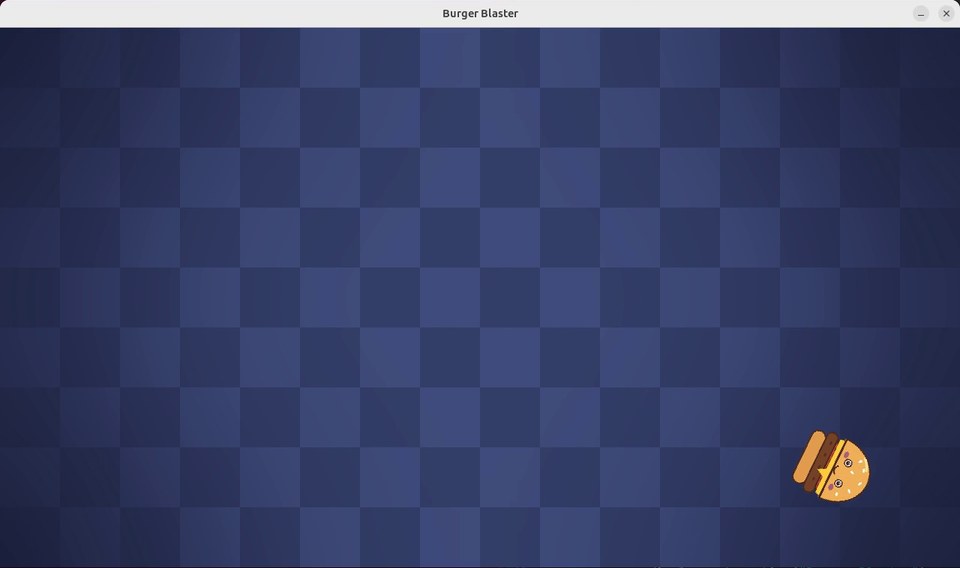
Episode 2 running: the burger turned and drifting across the floor.
Tuning the feel
All the feel of the flight is in four numbers at the top. Change one at a time and run it:

TURN_SPEED = 220           lower is a heavy ship, higher is a twitchy one
THRUST = 420               how fast it picks up speed
FRICTION = 0.55            1.0 means no friction at all, it drifts forever; 0.1 stops almost at once
MAX_SPEED = 480            the speed limit

The values in the file are the ones the rest of the series uses, so if you change them, remember what you changed. Episode 3 fires fries from the front of the burger, so the fries will follow the angle you made here.
Try it yourself
Three small changes before episode 3:

1  Set FRICTION to 1.0, and then to 0.2. Which one is harder to play, and why?
2  Make the burger turn twice as fast while Up is held, by changing the turn speed inside update.
3  Make it wrap with no margin (margin=0). What do you see at the edge?

Episode 3 makes the burger shoot: Space fires fries that fly straight and expire.
Check your work
If something is different:

NameError: name 'Player' is not defined          the Player class has to come above class Game in the file
AttributeError: 'Player' object has no attribute 'vel'     in step 2, vel has to be set in reset()
the burger turns the wrong way                   the minus sign in rotate(image, -angle) is missing
the burger does not move, only turns             direction * THRUST * dt is missing from update, or Up is not held
it pops from one side to the other at the edge      margin is too small: try 64, half the picture width

Not run in the lab: other Linux distributions, Wayland-only sessions, a joystick, and pygame older than 2.6.